Hey guys! I have allowed the place IDs that you sent us via the AirGradient support to automatically update your AirGradient ONE/Open Air to FW 3.6.2.
You don’t have to do anything else when it’s time for the monitor to perform an OTA FW check (typically every 1 hour), your monitors will automatically download and install the 3.6.2. In case you don’t want to wait, you can power cycle (unplug and plug in again) your AirGradient monitors so they will check the new firmware when they boot up and perform the update.
Hi @tadawson , thank you a lot again for the test.
I believe the .bin file that @Samuel_AirGradient gave you is an untagged firmware version for testing the patch, so it will show something like 3.6.1-1, and the dashboard won’t display the version (which is expected).
Since this firmware is untagged, the dashboard will not be able to manipulate (automatically force) the OTA FW update over that monitor running this untagged firmware.
Thanks. I’ll keep this on until I see 3.6.2 drop to ensure no other issues. I had just noted those differences, well, because noting things is part of testing.
Hi @gianfranco.bottini I have set the target firmware for your dashboard to 3.6.2 already. I believe it could take a while (a few hours) before your air monitors detect the new firmware, as the AirGradient ONE and Open Air checks for a new update once every hour.
Anyway, you can simply force it to update more quickly by power cycling the monitor (unplugging and plugging in the power adapter or the USB-C), as the AirGradient ONE and Open Air will also check for a new update every time it first boots up (after it loses power and has access to power again).
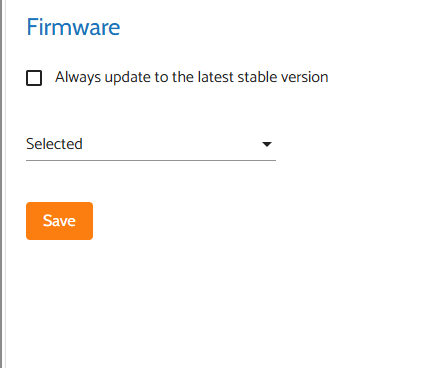
Please note that from your dashboard view, you may not see a selected firmware as 3.6.2 in the firmware setting page; you might see a blank ‘selected’ version, which you can ignore.
It could look like this:
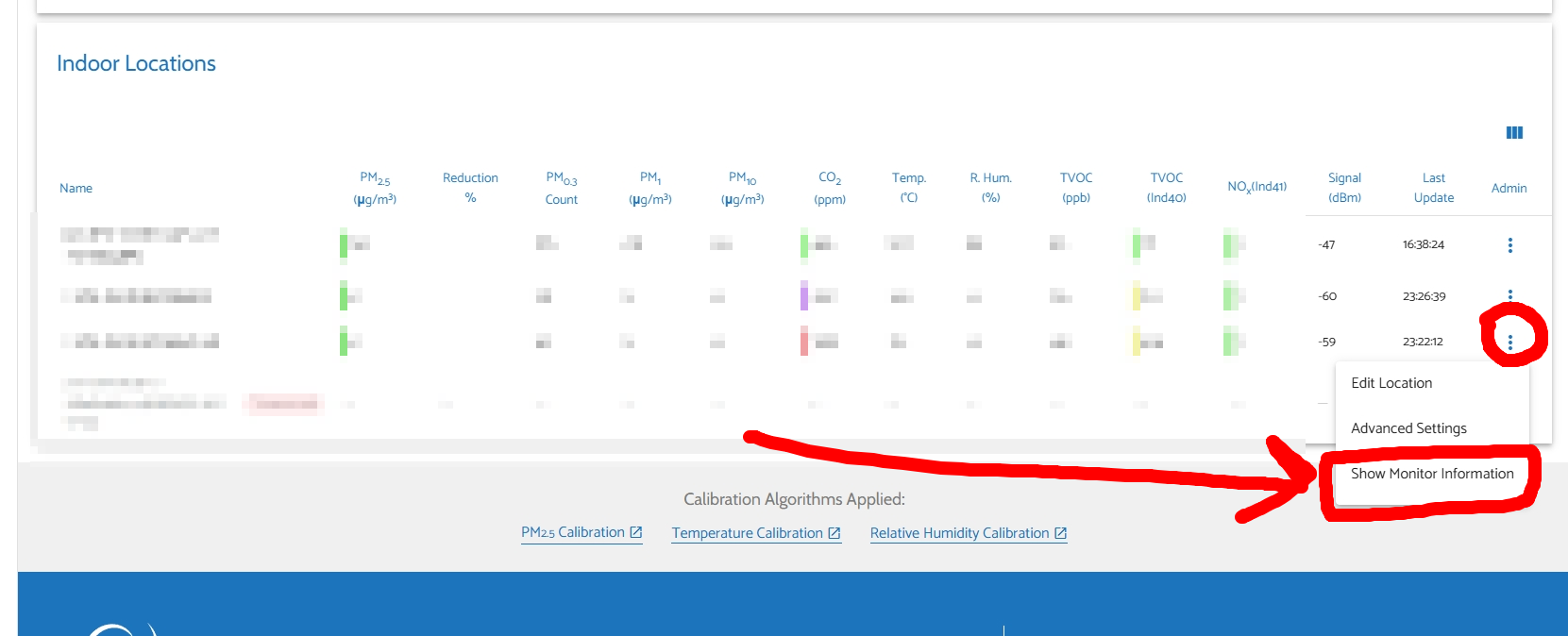
Please completely ignore this and don’t have to do anything to get the 3.6.2. Then, you can open the ‘Show Monitor Information’ of each monitor to see if it is updated or not.
@Tai_AirGradient : I sent you my place ID via the zendesk support. Feel free to update my devices. I will see it in the HA integration when it happened and will come back to you in case of further disconnects or other unexpected effects. Cheers
Thank you a lot for the update @tadawson@gianfranco.bottini!, Greatly appreciate your contribution to testing this!
Hi @rural_breeze, I believe I have added your place to the 3.6.2 list. Your monitor should update to 3.6.2 in a few hours as I mentioned in my above reply.
Please let me know if you still don’t get the update after several hours. Thanks!
Hi @Mud0556 Thank you in advance for providing the details. Would you mind testing the new firmware (3.6.2) to see if the issue persists? I would appreciate it if you could let us know your Place ID as mentioned in this reply.
New user here, Place ID: 22147 I purchased by AirGradient Open Air KIT from telescopescanada on January 25 2026 and I have not able to get more than 2 days operation without the Open Air going offline.
I was staring to wonder if only works in warm clients and not in Quebec Canada where we have cold winters -20c at night this time of year.
I saw this form post and self-enrolled by sending a request to support and now my device is on 3.6.2.
Thank you. I will report back if any more disconnect occur.
No issues seen on Samuel’s build on my indoor, so reflashed it and picked up 3.6.2 OTA with no issues, so now both my units are on 3.6.2, and continuing to monitor.
Out of the four monitors I have at home, only one experienced the “Wi-Fi Dropped and won’t reconnect” bug. Rebooting the monitor brought it back online, and it hasn’t experienced a drop since.
Using Ubiquiti U6 Enterprise and U6 Enterprise IW APs at home, and the Wi-Fi network is a pure WPA3-SAE network. My monitors are the AirGradient ONE (x3) and AirGradient Open Air (x1).
I likewise created this new account in order to post some info in the hope that it helps troubleshooting.
I have 2 monitors (indoor and outdoor) but only the outdoor one has a problem. As I type this, both my devices have downgraded to 3.4.1.
Anyways here goes:
Model number of the monitor that has the issue? (I-9PSL-DE, O-1PST, etc.).
My O-1PST has this issue.
Symptoms:
I get circa 9 hours of operation then the system vanishes from the LAN. ICMP pings are unanswered (On MacOS: “ping: sendto: No route to host”). HomeAssistant reports loss of data as does the AirGradient dashboard.
What does the OLED screen of the monitor show when it is disconnected? N/A
Network setup: “flat” network topology, no VLAN’s, DNS and firewall are all wired, IPv4 only.
AirGradient monitor configuration:
Here is the affected O-1PST:
Is your Wi-Fi network using a unified band (a combined Wi-Fi name without separating 5GHz and 2.4GHz)?
Both!
The affected outdoor monitor O-1PST is on a dedicated AP for garden IOT presenting a unique SSID over 2.4GHz only.
However, the functioning indoor monitor I-9PSL-DE is on a unified band (5GHz+2.4GHz) on a different SSID.
Is your Wi-Fi a mesh system, have multiple access points, or use Wi-Fi extender?
Multiple access points, each GbE backhauled for data+POE.
Do you have your Wi-Fi DHCP server configured to assign a static IP address for connected devices?
Yes.
Does the monitor connect to Home Assistant or other platforms?
Yes but the AirGradient cloud dashboard is used for configuration.
Is this Wi-Fi issue gone after you downgrade your AirGradient monitor from firmware 3.6.0 to 3.4.1?
No. However the O-1PST downgraded itself to firmware 3.4.1 yesterday AM after a power cycle. It was functioning ok that day until it lost the connection again at 2000GMT only to re-appear at 0705GMT without any action on my part (Cloud and HA).
The I-9PSL-DE has remained online with both firmwares (again, visible in Cloud and HA).