AirGradient Forum

Firrmware for AirGradient Pro DIY

Hi all. I have three variants of AirGradient Kits. The Pro DIY (PCB version 3.7), The Outdoor and Indoor Model I-9PSL.

I was wondering if the legacy PCB Version 3.7 still has firmware support. I’ve been unsuccessful in updating via:

https://www.airgradient.com/documentation/kb/kb-old-instructions-the-airgradient-diy-air-quality-sensor-pro-version-pcb-version-3-7-diy-pro-v37/

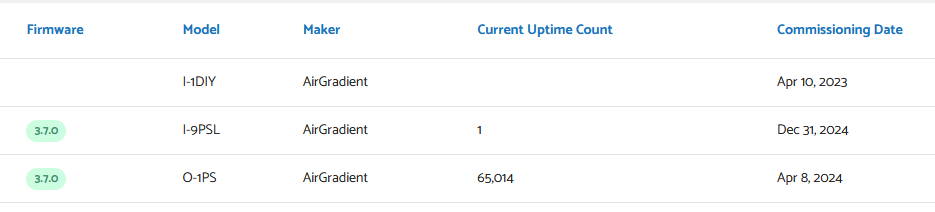
The firmware is not displayed in the dashboard unlike the I-9PSL and O-1PS.

Thanks in advance!

Hi @Severed, welcome to our community!

Could you let me know more details about “The firmware is not displayed in the dashboard unlike the I-9PSL and O-1PS.”? Do you mean the firmware version number is not displayed on the Dashboard, but the monitor reports to the Dashboard normally? Do I understand correctly, or does the monitor not report readings to the Dashboard at all?

This post and the discussions there might be helpful for you: Test Version for PCB v 3.7 with HA Support and Other Features

Thank you, and I hope you have a good day!

Hi Tai,

You’re correct. the firmware does not display, it does report data to dashboard.

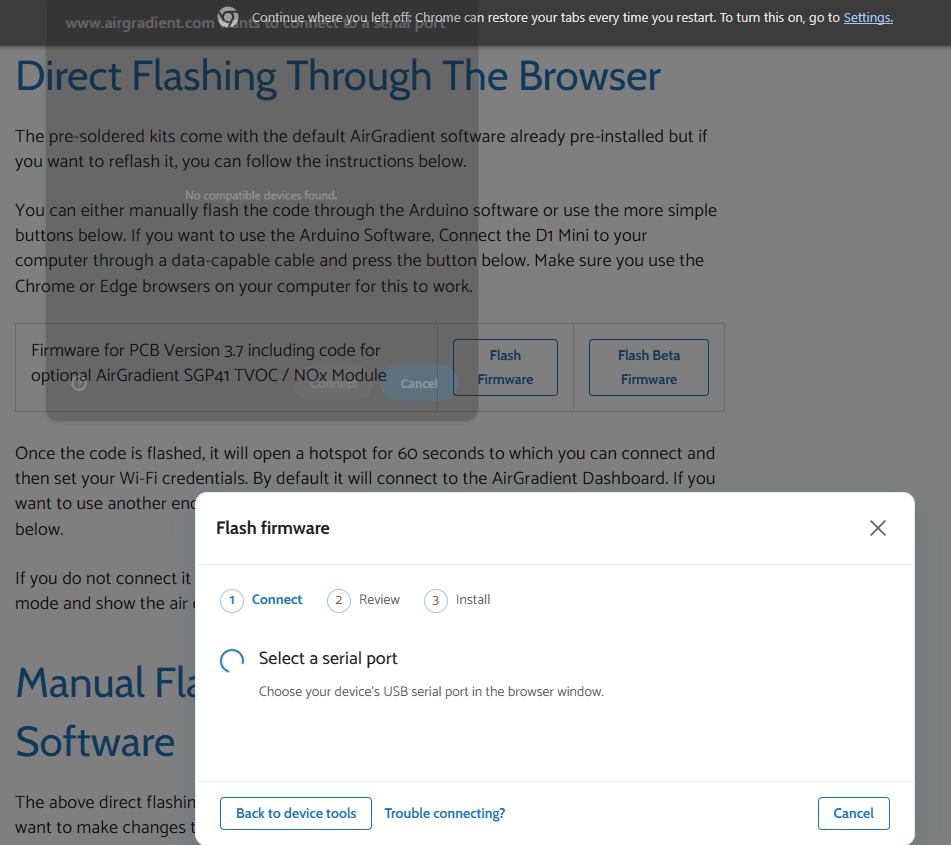
I tried to update the firmware of the I-1DIY D1 mini (by plugging in the D1 mini directly), via web flash and Arduino IDE, however in both instances it was not recognized. I troubleshot the cable by plugging in the I-9PSL and it was recognized.

Hi @Severed, thank you for letting us know about the web flash issue. We have revamped our web flash tool to be more user-friendly and check whether the MCU is correct (based on our active products). Please let me discuss this with our team to see whether we can preserve the legacy web flash tool for legacy hardware models.

A follow-up question after you successfully flashed the firmware as you showed above. Does the AirGradient Dashboard display the firmware version number, or does it still not show? Thank you!

Hi again @Severed, I think I misunderstood a little bit about your ‘not recognized’ case. I thought it was a case where the web flash tool says the MCU doesn’t match. Then I reviewed your screenshot once again, and it appears to be the case that your web browser (Chrome) shows ‘No compatible devices found’.

I wonder if this is caused by a driver issue.

Hi @Tai_AirGradient, I installed the drivers that are presented in the troubleshooting options, but was unsuccessful in getting the legacy hardware recognized. I appreciate you looking into this. I do have home assistant and was going to attempt to connect, but it seems I will be unable. Do you happen to know if the legacy board is compatible with an AirGradient One microcontroller?

Hi @Severed, thanks for the update!

Regarding your question, do I understand correctly that you would like to know whether your DIY PRO PCB Version 3.7 supports implementing the ESP32-C3 (the MCU used in the AirGradient ONE and Open Air)? Do you plan to modify the MCU? Please feel free to let me know, I can discuss it with our engineer and will come back with more information.

One more question: after you installed the driver, you still see the “No compatible devices found.” in Chrome’s USB prompt window, is that correct?

I wonder if you could try simultaneously plugging a power supply into the board’s USB-C port and plugging the D1 Mini directly into your computer, and see if your computer detects the D1 Mini? Thanks!