about 4 watts/800ma according to the screen on my battery. My usb current monitor is buried somewhere
1 Like
Hi @Austin_Richards, thanks for the reply. I will let you know when there’s an update from our team. Thanks!
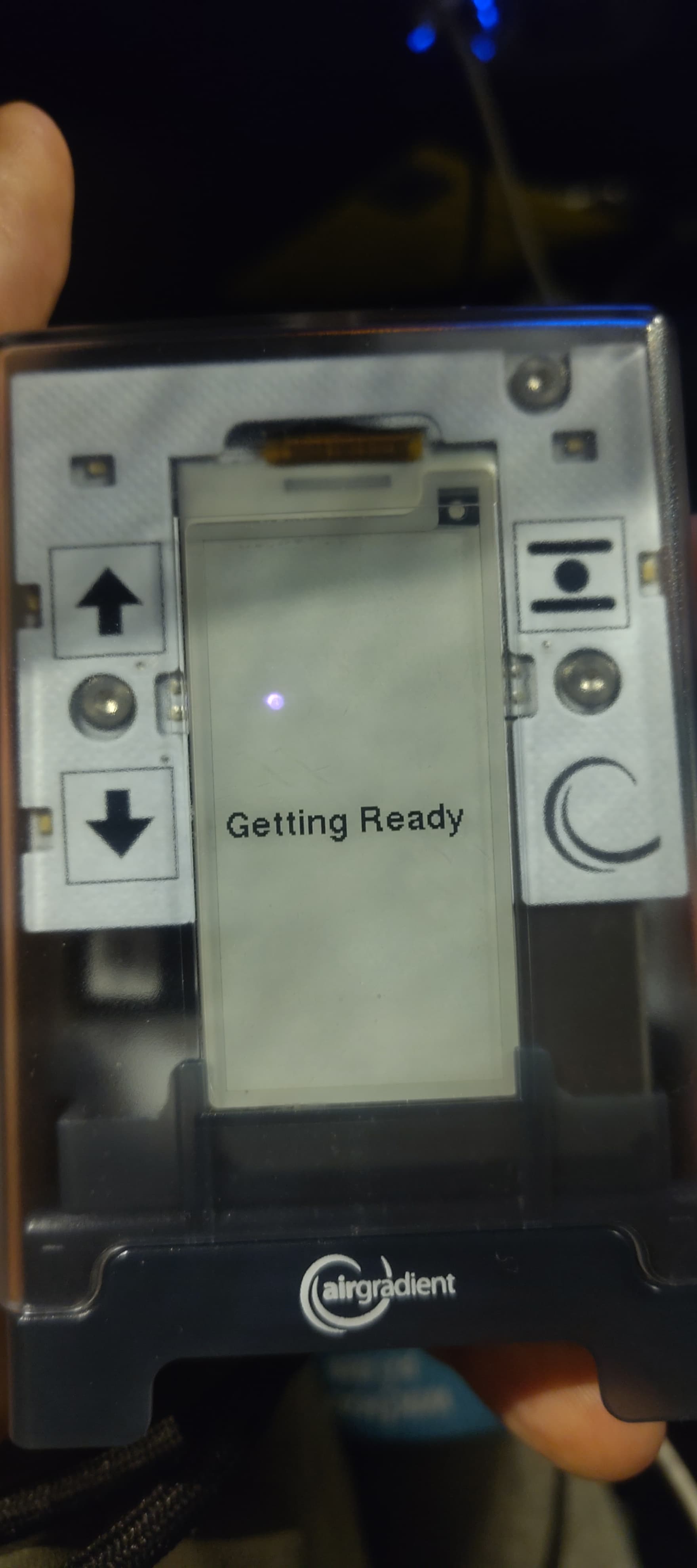
Hi all, yesterday I switched on my airgradient go and it freezed with the message in the picture (Getting Ready) forever.
I have tried to switch off or charge with no results.
What can I do?
Hi @nuraiman, welcome to our community, and sorry for the inconvenience you have experienced.
Could you please try unplugging the USB-C, then press and hold the Go’s power button for approximately 12 seconds to see if the Go reboots?
You can take a look at this article for more details: AirGradient Go: Performing a Hard Reset | AirGradient Knowledge Base
Please feel free to let us know if the issue still persists or if you have any questions. Thank you!
I think a firmware reflash here may be worth trying: AirGradient Monitor Firmware Updates | AirGradient Knowledge Base
Regarding the Go charging time, just for reference.
I charged my Go from empty battery (0%), left plugged in overnight.
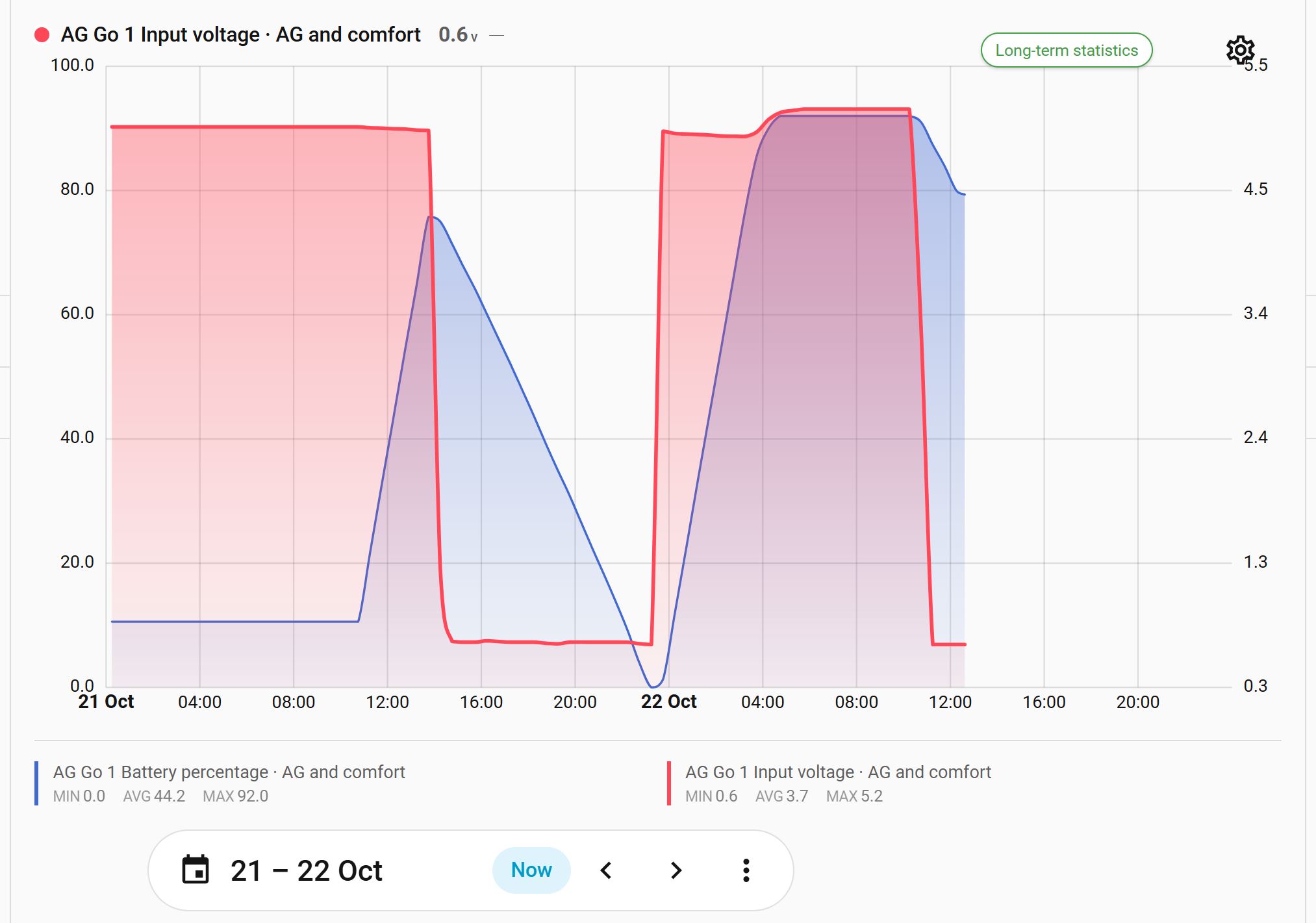
Charging started at 23:15 and ended at 04:45. The battery showed the normal 92% reading when charged.
I had my Atorch ATO85 USB-C meter connected in series with the USB cable and, when charging started, this showed the following readings:
5.11V, 0.49A, 2.53W
The voltage then dropped a fraction and continued steady until the battery reached 85%, when it gradually rose to 5.2V by the time the battery was 92%.
Other than the initial meter reading, the rest of the readings are from the Home Assistant Go graphs for Battery percentage and input.
edited the original paragrapgh:
Monitoring the current used on a later Go charge, the current remained at around 2.8W and the voltage 5.06V until the battery was almost charged.
When fully charged and the Go running powered by the USB, the current was approximately 0.8W (0.15A) and the voltage 5.2V (with very minor variations over time)
Tracking was off, and the Go was connected via WiFi. 100W power supply
The graph (attached) shows the battery percentage in blue and the charging voltage input in red. The figures above are for the right-hand side of the chart, starting at 23:15 on 21st October.
1 Like
I have a similar charge time. My go often lives with a usb battery attached due to the slow charging. (Though if I charged it overnight instead of only when driving & at work it would probably be fine)
1 Like
@Rog, thank you a lot for sharing your findings! We are exploring ways to improve the battery life, as mentioned in https://www.reddit.com/r/airgradient/s/Najra4m1Vo This should reduce the need for frequent charging.
Anyway, I’m still following up with our team about the possibility of modifying the firmware to make it charge faster.
1 Like
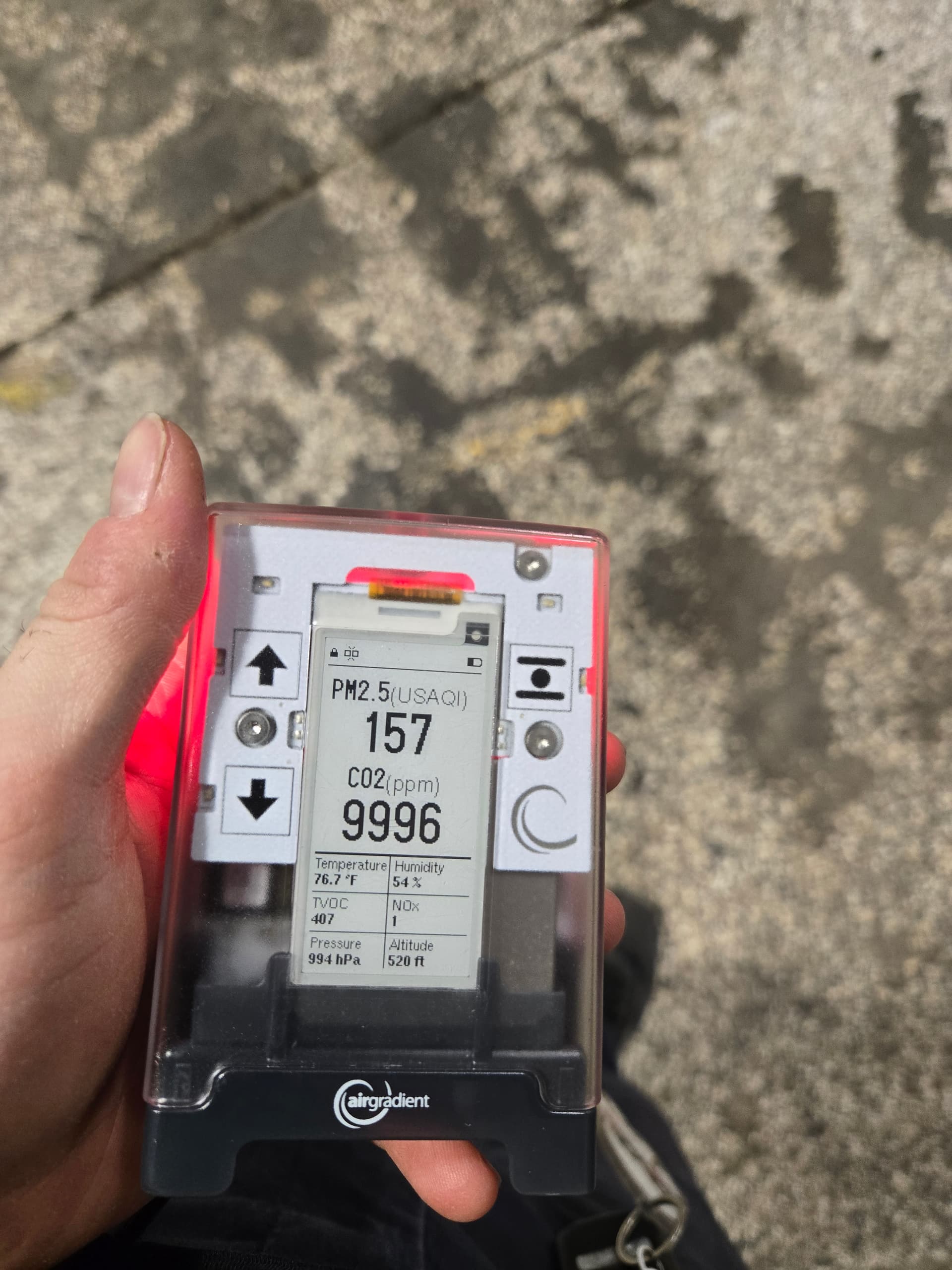
Fun thing that isn’t a product issue. If you exceed 9999 PPM CO2 the meter displays a dash instead of a number, which occurs often at my cursed workplace
1 Like
@Austin_Richards, may I ask what kind of machines or processes produce such high CO2 in your work environment? Would be interesting to hear.
I work at a brewery for carbonated hard cider. CO2 is used in every step of the process.
As the holding tanks in the pasturizer fill up/drain CO2 is added/vented to maintain the tank pressure. CO2 is released from the canner before the lids are sealed on the cans. Fermenting product releases CO2 and we dump CO2 into the cellar tanks to bring the oxygen level in the liquid down.
Lots of areas that can reach 10,000PPM+, especially in the cellar catwalk.
We have some fixed CO2 monitors (up to 5%) but the strobe/alarm is unplugged as people got tired of it going off. It was the compromise to stop management and others from unplugging the entire meter. Many of the meters are broken aswell due to water damage.
You start feeling really weird at 2%/20,000ppm+ CO2. Dizziness, loss of situational awareness, shortness of breath.
1 Like
Wow, thanks for sharing. I knew CO2 is used in beverage production, but never actually knew how it is used in each process.
I wonder, the ‘start feeling’ that you mentioned when CO2 reaches very high level, how intense and how fast does that feeling start? I think most people, including me, rarely have a chance to be exposed to that level of CO2. My worst CO2 experience (that I measured with the Go) was when I was traveling in a public van (in Thailand). There were about 15 people in a Toyota Commuter van, and the measured CO2 was 5000+. It usually feels drowsy for me when traveling with this kind of transport, but I’m not actually sure whether I’m just sleepy or the high CO2 hits me hard.
This is from my own personal experience. After about 15000ppm you will start to feel slightly disoriented but unable to tell why. It’s subtle such as bumping into things more or a higher risk of dropping things.
Decision making starts to fall apart past 20,000ppn but usually around that point I can tell what is happening and either move to an area with better ventilation or open the bay doors.
The effect of the high co2 is pretty quick. Within seconds of entering the area you can feel the effects.
Luckily all we need to do past 10,000ppm is open the bay doors (zero ventilation when closed) but no one wants the doors open in the winter. Days without wind can cause the co2 to rise indoors.
It is fun how the OSHA limit for CO2 is 5000ppm for 8 hours, but whenever OSHA visits conveniently all of the bay doors are open
1 Like
It’s a shame the display leds were removed. I keep finding myself needing to use my flashlight to see the screen
1 Like
Hi @Austin_Richards, thank you for sharing this. So CO2 drops below 5,000 ppm when the doors are open?
Regarding the display, yes, a light source is needed if you want to see the e-paper display in a low-light or dark environment. The Display LED in our previous version provided some light to reflect off the e-paper display’s surface, but it still didn’t give a clear view, so we decided to remove it.
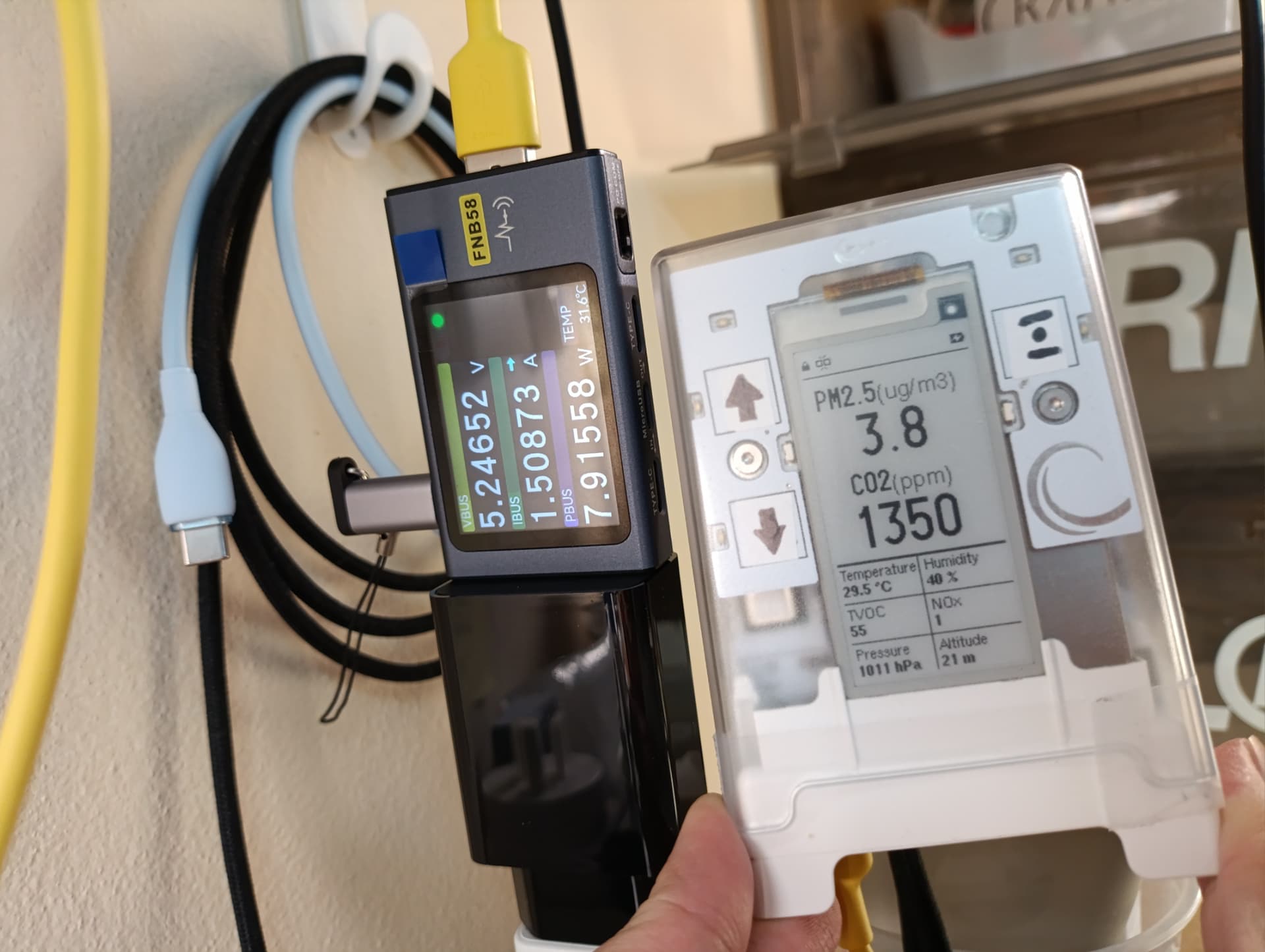
Anyway, I got more info from our engineer about modifying the firmware code to allow more charging current. He said that the charging current is limited by a resistor. If you would like to unlock the limit, you need to disable the external ILIM pin at REG0x19
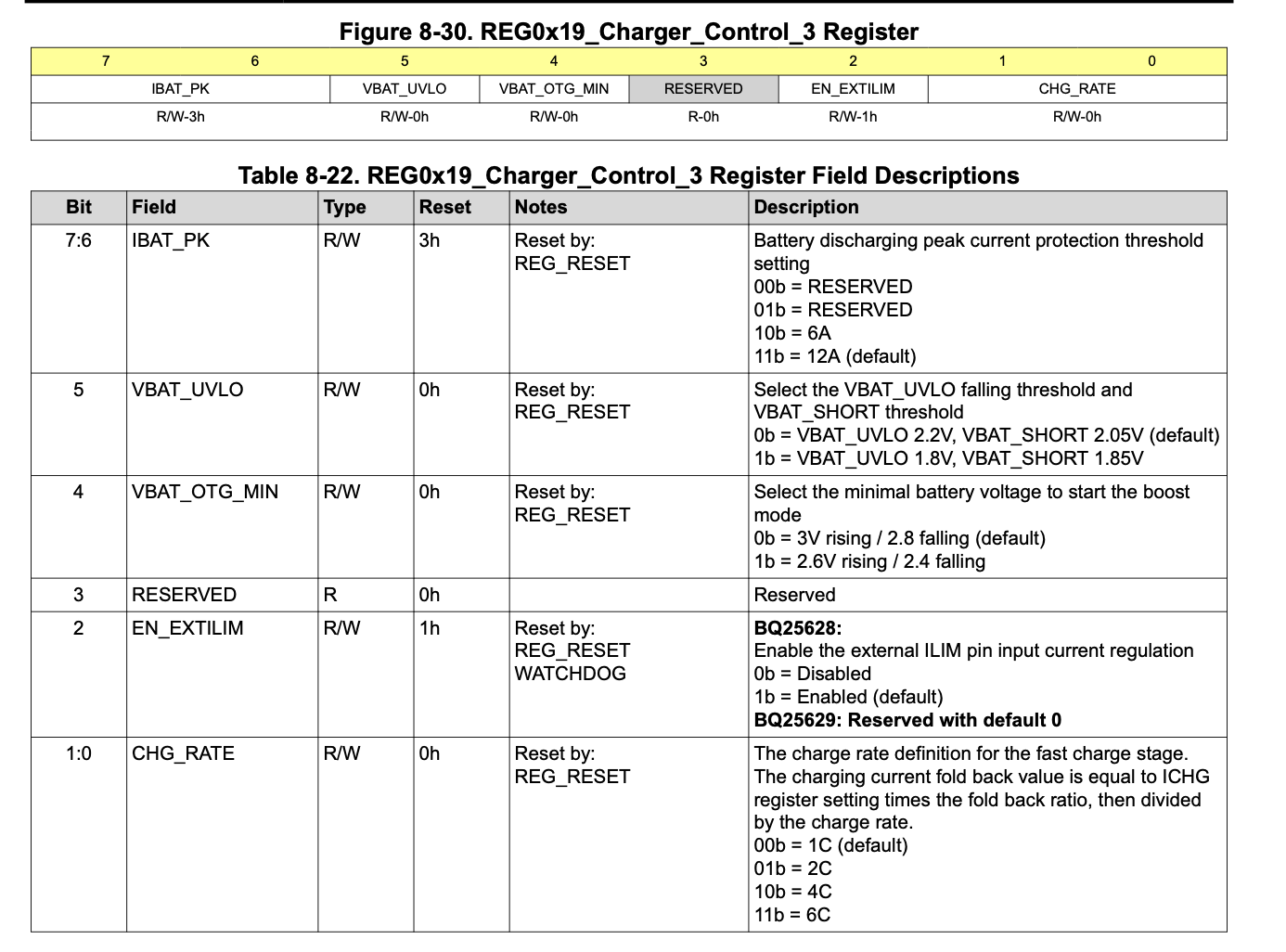
So, from what I experimented with my Go (please note that this is not a lab-tested behavior, so no safety is guaranteed).
The first image is the Go being charged when running the original firmware:
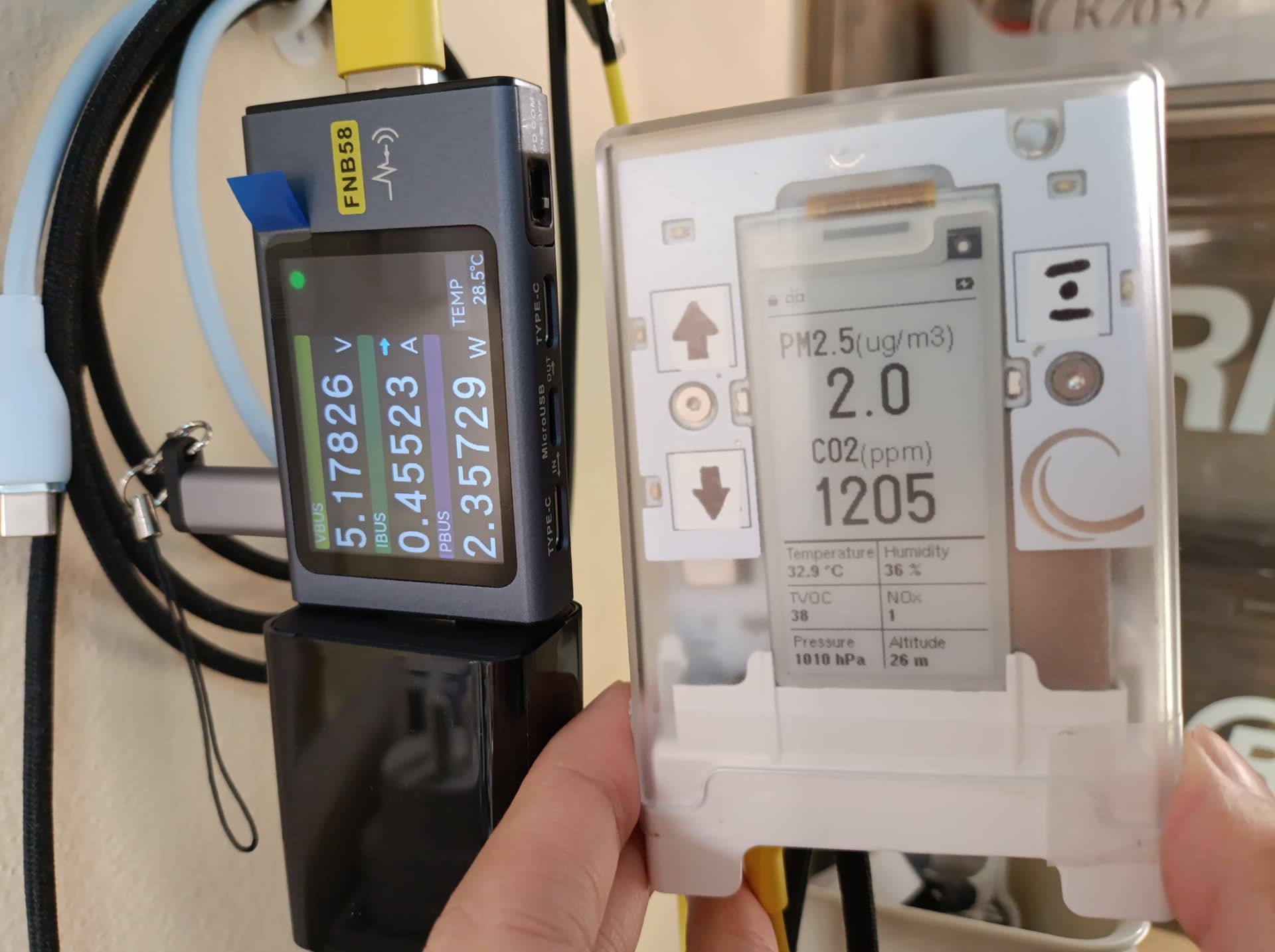
And the next one, running on my vibe-codex firmware (I asked Codex to do this for me, as I don’t have the skill to code myself. I’d suggest anyone who wants to try this make sure that you understand the risk, especially when this involves a physical device, battery.):
1 Like
Anyway, folks, it would be cool if you guys could join our live webinar (via Zoom), an AMA (Ask Me Anything) session with AirGradient CEO & Co-founder, Achim. He will be there to answer your questions about the AirGradient Go.
On October 30, 2026 (Friday), at 9 PM (Bangkok Time).
More details here: https://www.linkedin.com/events/7520318778065276928/
Looking forward to seeing you guys there!
Generally yeah, though if there is no wind the CO2 will rise, and the cellar catwalk is always high.
This was today in the area I was working in.
I’ll have to try this. Hopefully its eventually exposed as a user option.
oh minor bug I found. AQI LEDs stay lit when the go is powered off.
1 Like
@Austin_Richards, thanks for your quick reply! That number is insane.
oh minor bug I found. AQI LEDs stay lit when the go is powered off.
Thanks for the report. Are your Go running on firmware version 1.1.2?
I’ll have to check in the morning but it’s currently on a dev version from a week ago, but it also happened on the launch firmware
I just turn the LEDs off after work now.
1 Like