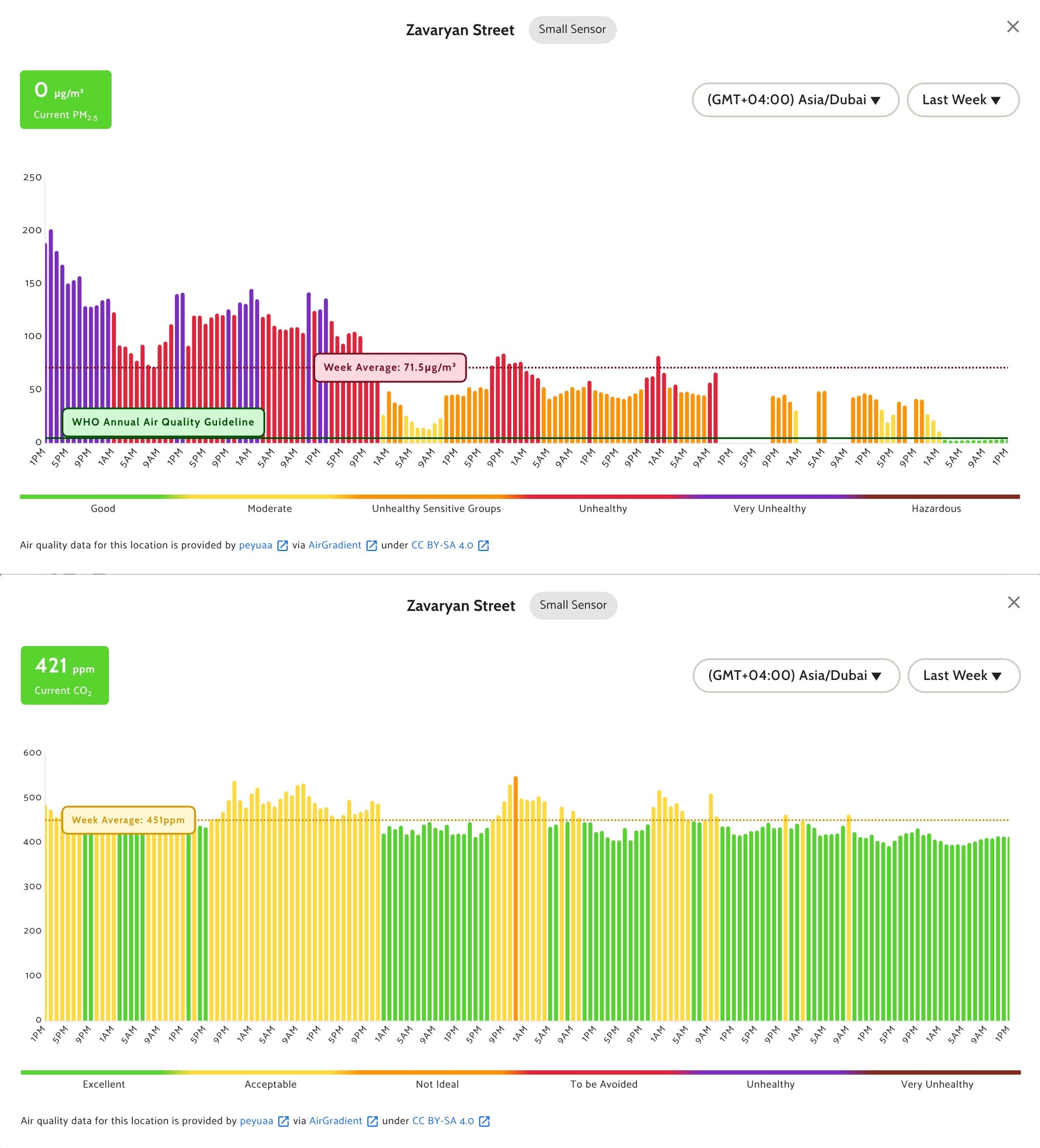
Hi! Quick update: I did some debugging and I think I found what’s causing the sensors to “disappear”.
It looks like the map requests PM2.5 clusters with excludeOutliers=true by default:
https://map-data.airgradient.com/map/api/v1/measurements/current/cluster?xmin=44.42922592163087&ymin=40.12192811696267&xmax=44.59075927734376&ymax=40.2180773631753&zoom=13&measure=pm25&excludeOutliers=true
When I call this endpoint, the response contains only Sensor.Community stations (8 sensors) and none of the AirGradient sensors in Yerevan:
{
  "data": [
    {
      "type": "sensor",
      "latitude": 40.152,
      "longitude": 44.49,
      "locationId": 16015555,
      "locationName": "Sensor.Community: 75606",
      "sensorType": "Small Sensor",
      "dataSource": "SensorCommunity",
      "value": 40
    },
    {
      "type": "sensor",
      "latitude": 40.21337588179,
      "longitude": 44.52432900667,
      "locationId": 16016072,
      "locationName": "Sensor.Community: 79360",
      "sensorType": "Small Sensor",
      "dataSource": "SensorCommunity",
      "value": 57
    },
    {
      "type": "sensor",
      "latitude": 40.20348944341,
      "longitude": 44.52628970146,
      "locationId": 16016733,
      "locationName": "Sensor.Community: 83034",
      "sensorType": "Small Sensor",
      "dataSource": "SensorCommunity",
      "value": 51
    },
    {
      "type": "sensor",
      "latitude": 40.136,
      "longitude": 44.524,
      "locationId": 16016839,
      "locationName": "Sensor.Community: 83720",
      "sensorType": "Small Sensor",
      "dataSource": "SensorCommunity",
      "value": 48
    },
    {
      "type": "sensor",
      "latitude": 40.20332441924,
      "longitude": 44.51700925827,
      "locationId": 16016856,
      "locationName": "Sensor.Community: 83797",
      "sensorType": "Small Sensor",
      "dataSource": "SensorCommunity",
      "value": 39
    },
    {
      "type": "sensor",
      "latitude": 40.1988803,
      "longitude": 44.57414212761,
      "locationId": 16016923,
      "locationName": "Sensor.Community: 84097",
      "sensorType": "Small Sensor",
      "dataSource": "SensorCommunity",
      "value": 35
    },
    {
      "type": "sensor",
      "latitude": 40.17657570728,
      "longitude": 44.5044403011,
      "locationId": 16017570,
      "locationName": "Sensor.Community: 87293",
      "sensorType": "Small Sensor",
      "dataSource": "SensorCommunity",
      "value": 49
    },
    {
      "type": "sensor",
      "latitude": 40.2025962,
      "longitude": 44.4910776,
      "locationId": 16017717,
      "locationName": "Sensor.Community: 88206",
      "sensorType": "Small Sensor",
      "dataSource": "SensorCommunity",
      "value": 49
    }
  ],
  "total": 8,
  "page": null,
  "pagesize": null
}
However, if I make the same request with excludeOutliers=false:
https://map-data.airgradient.com/map/api/v1/measurements/current/cluster?xmin=44.42922592163087&ymin=40.12192811696267&xmax=44.59075927734376&ymax=40.2180773631753&zoom=13&measure=pm25&excludeOutliers=false
…then both AirGradient monitors appear in the response:
{
  "data": [
    {
      "type": "sensor",
      "latitude": 40.200467,
      "longitude": 44.49794,
      "locationId": 1181,
      "locationName": "Nkarichneri shenq",
      "sensorType": "Small Sensor",
      "dataSource": "AirGradient",
      "value": 94
    },
    {
      "type": "sensor",
      "latitude": 40.166727,
      "longitude": 44.511603,
      "locationId": 14890052,
      "locationName": "Zavaryan Street",
      "sensorType": "Small Sensor",
      "dataSource": "AirGradient",
      "value": 117
    },
    {
      "type": "sensor",
      "latitude": 40.152,
      "longitude": 44.49,
      "locationId": 16015555,
      "locationName": "Sensor.Community: 75606",
      "sensorType": "Small Sensor",
      "dataSource": "SensorCommunity",
      "value": 39
    },
    {
      "type": "sensor",
      "latitude": 40.21337588179,
      "longitude": 44.52432900667,
      "locationId": 16016072,
      "locationName": "Sensor.Community: 79360",
      "sensorType": "Small Sensor",
      "dataSource": "SensorCommunity",
      "value": 54
    },
    {
      "type": "sensor",
      "latitude": 40.20348944341,
      "longitude": 44.52628970146,
      "locationId": 16016733,
      "locationName": "Sensor.Community: 83034",
      "sensorType": "Small Sensor",
      "dataSource": "SensorCommunity",
      "value": 53
    },
    {
      "type": "sensor",
      "latitude": 40.136,
      "longitude": 44.524,
      "locationId": 16016839,
      "locationName": "Sensor.Community: 83720",
      "sensorType": "Small Sensor",
      "dataSource": "SensorCommunity",
      "value": 51
    },
    {
      "type": "sensor",
      "latitude": 40.20332441924,
      "longitude": 44.51700925827,
      "locationId": 16016856,
      "locationName": "Sensor.Community: 83797",
      "sensorType": "Small Sensor",
      "dataSource": "SensorCommunity",
      "value": 45
    },
    {
      "type": "sensor",
      "latitude": 40.1988803,
      "longitude": 44.57414212761,
      "locationId": 16016923,
      "locationName": "Sensor.Community: 84097",
      "sensorType": "Small Sensor",
      "dataSource": "SensorCommunity",
      "value": 34
    },
    {
      "type": "sensor",
      "latitude": 40.17657570728,
      "longitude": 44.5044403011,
      "locationId": 16017570,
      "locationName": "Sensor.Community: 87293",
      "sensorType": "Small Sensor",
      "dataSource": "SensorCommunity",
      "value": 47
    },
    {
      "type": "sensor",
      "latitude": 40.2025962,
      "longitude": 44.4910776,
      "locationId": 16017717,
      "locationName": "Sensor.Community: 88206",
      "sensorType": "Small Sensor",
      "dataSource": "SensorCommunity",
      "value": 49
    },
    {
      "type": "sensor",
      "latitude": 40.204,
      "longitude": 44.5,
      "locationId": 16017891,
      "locationName": "Sensor.Community: 88894",
      "sensorType": "Small Sensor",
      "dataSource": "SensorCommunity",
      "value": 76
    }
  ],
  "total": 11,
  "page": null,
  "pagesize": null
}
So it seems the map is filtering out its own AirGradient monitors as “outliers” for PM2.5 in this area, which makes them vanish from the PM2.5 / AQI layers. CO₂ still shows, which matches what I’m observing.
This also explains why the issue is intermittent: whenever excludeOutliers=true filters them out, they disappear; when the filtering doesn’t exclude them, they can reappear.
Could you please check the outlier detection for PM2.5, especially after adding Sensor.Community data? It feels like the local baseline changed and now the AirGradient stations are incorrectly classified as outliers.
Thanks!