Thanks for implementing the GO IAQS Led option in firmwre 3.7.0. Nicely done! I enabled that option for my indoor ONE unit via the web site. FYI, the IOS app does not have the display settings option to configure for IAQS.
1 Like
Hi @ChrisL, glad to hear that you enjoy the GO IAQS mode on the AirGradient ONE!
And thank you so much for reporting the iOS app issue. I have created a ticket for our developer about this. It should be fixed in a future release. Thanks!
2 Likes
Yes the new GO IAQS LED mode is fantastic!
Could you add this mode to the Airgradient Go?
And could you also add CO2 levels LED mode to the Go?
It would be great if we can choose LED mode between CO2, PM2.5 and GO IAQS on the Airgradient Go like we can with the Airgradient ONE.
2 Likes
Hi @Bart_Netherlands, you’re right! The current Go LED only reflects the PM2.5 level. Let me bring this up in today’s meeting.
1 Like
Hi @Tai_AirGradient , great, thanks for bringing it up.
When I use the Go for travel and I am in a hotel room for example, I would like to set the LED to CO2. Because CO2 is the only thing I can influence (by increasing ventilation/opening windows). Since I don’t travel with an air purifier CO2 LED is more usable to me than PM2.5 in this situation.
I would also like to see the following for the Airgradient Go:
- a custom LED brightness setting in percentage
- a daytime/nighttime setting for the LED brightness
Let me explain:
I currently have an Airgradient One in my bedroom. I have set nighttime setting to screen off and LED brightness 1%. This way the LED brightness doens’t bother me in a dark bedroom. And I can still see the LEDs. This way I can see if the CO2 level is acceptable if I wake up in the night. I don’t have mechanical ventilation so I always have my windows a bit open. Sometimes when there’s very little wind I have to open my windows wider to get enough ventilation. I would like to use my Airgradient Go for travelling and it would be great to use it like this during nighttime.
1 Like
Hi @Bart_Netherlands, thank you so much for your detailed explanation. That’s really helpful for us to understand your use case.
Since the AirGradient Go doesn’t have a long strip of LEDs. So it might not be able to indicate the CO2 level as granularly as the AirGradient ONE’s LED bar.
Here’s the AirGradient ONE’s LED bar set on CO2 level mode:
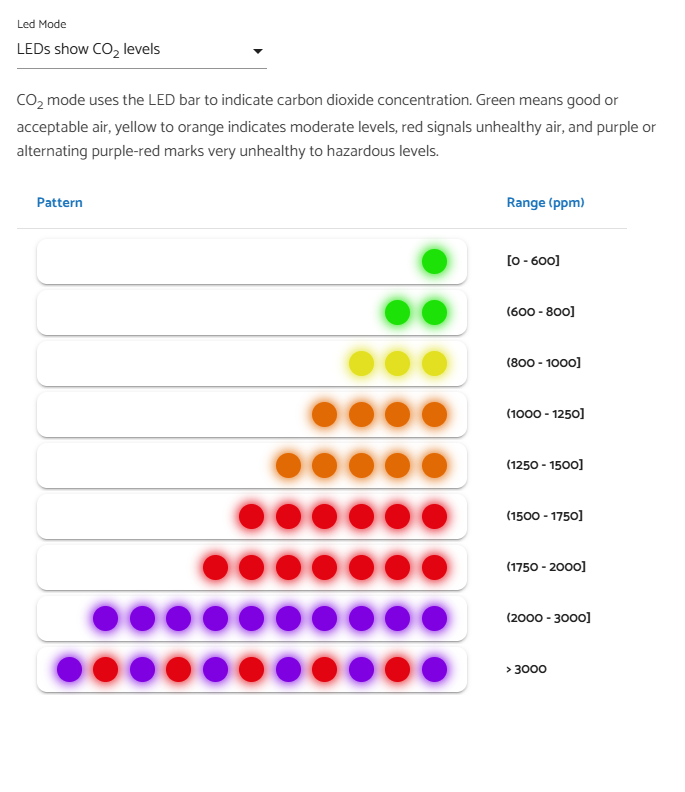
Do you think it makes sense if the Go shows the LED color in the CO2 mode like this:
- 0-800ppm = Green
- 800-1000ppm = Yellow
- 1000-1500ppm = Orange
- 1500-2000ppm = Red
- 2000-3000ppm = Purple
- Greater than 3000ppm = Red+Purple
Or do you have different suggestions for this? Please feel free to let us know. Thanks!
1 Like
Hi @Tai_AirGradient , thanks for your answer.
I’ve been thinking about this for some time and want to share my thoughts in detail so you can understand my thinking process.
Request for finer granularity at low levels
On the AirGradient ONE I have been using the CO2 level LED mode until I switched to the GO IAQS mode when it became available. At home I have an air purifier and the PM2.5 is so low that the GO IAQS score only decreases because of my CO2 level. I I must say that I really like the increased granularity in the range of 0-800ppm.
Here’s the difference:
CO2 LED mode
0-600 = Green
600-800 = 2x Green
800-1000 = 3x Yellow
GO IAQS LED mode
0-500 = 1x Blue
500-700 = 2x Blue
700-800 = 3x Blue
800-900 = 4x Orange
I always try to stay under 800ppm, so when I see that the level is above 800 my action is always the same: increase ventilation. So granularity above 800 is not so important to me, it can be more coarse. Most of the time I am in the 400-800 range and I enjoy the increased granularity because I can see at a glance what the level is and also how quickly it rises when I am entering and sitting in a room. This way I can already predict when it will rise above 800 and ventilate before it rises above 800.
So at the current AirGradient ONE CO2 LED mode I find the granularity under 800 too coarse.
AirGradient Go LEDs
What colors does the Go have? I think the only way to see all the colors is by playing the tetris melody? When I play the tetris melody I think I can see the following colors:
Red
Orange
Yellow
Green
Blue
Purple
I find the yellow, orange and green a bit similar in color. I can see the difference between them, but it might be confusing to the average consumer. The green is more of a green-yellow and especially orange and yellow are quite close. The LED colors of the AirGradient One are all more distinguishable to me by the way. So I’m not sure it would be a good idea to use yellow, orange and green together on a score LED system on the Go.
The Go also has white touch LEDs in addition to the color LEDs. So I thought why not also use these for the quality score. I find them rather useless as touch LEDs to be honest. At the current firmware they can be enabled and turn on when I press a button. This just blinds me and I can see on the screen anyway if my press is registered. The only way I can see them useful as touch LEDs would be to change settings in the dark. But the behaviour would need to be different: The screen and the 3 buttons would have to light up and kept lit up for say 10 seconds after a button press. But since there’s no screen LEDs on my Go it doesn’t make sense to lit up the buttons since I still need to shine a light on the screen anyway to be able to read it. Maybe an idea for a version 2 of the Go in the future to have a lit screen. I read in a different forum post on this forum that the screen LEDs have been cancelled last moment because they didn’t really work? It seems there’s a space and connection for a LED left and right of the screen, but there are no LEDs there on my device.
I also see two front LEDs top left and top right, what are these for? As far as I can tell they have no functionality on the current firmware.
My suggestion
The AirGradient ONE in GO IAQS LED Mode behaves as follows when the PM2.5 is below 3 µg/m³ :
0-500 ppm = 1x Blue
500-700 ppm = 2x Blue
700-800 ppm = 3x Blue
800-900 ppm = 4x Orange
900-1100 ppm = 5x Orange
1100-1300 ppm = 6x Orange
1300-1400 ppm = 7x Orange
1400-2000 ppm = 8x Red
2000-3200 ppm = 9x Red
3200-4400 ppm = 10x Red
4400 ppm and above = 11x Red
I would like to suggest the following 9-step scale and LEDs for the AirGradient Go CO2 / PM2.5 / GO IAQS LED modes:
0-500 ppm / 0-3 µg/m³ / Score 10 = Blue + 1x White touch LED
500-700 ppm / 3-8 µg/m³ / Score 9 = Blue + 2x White touch LED
700-800 ppm / 8-11 µg/m³ / Score 8 = Blue + 3x White touch LED
800-900 ppm / 11-13 µg/m³ / Score 7 = Orange + 1x White touch LED
900-1100 ppm / 13-19 µg/m³ / Score 6 = Orange + 2x White touch LED
1100-1300 ppm / 19-23 µg/m³ / Score 5 = Orange + 3x White touch LED
1300-1400 ppm / 23-26 µg/m³ / Score 4 = Orange + 3x White touch LED
1400-2000 ppm / 26-39 µg/m³ / Score 3 = Red + 1x White touch LED
2000-3200 ppm / 39-64 µg/m³ / Score 2 = Red + 2x White touch LED
3200-4400 ppm / 64-88 µg/m³ / Score 1 = Red + 3x White touch LED
4400 ppm and above / 88 µg/m³ and above / Score 0 = Red + 3x White touch LED
This way the colors are easy to understand by the average consumer. And there’s still granularity by using the white touch LEDs. The addition of the white touch LEDs could be an optional setting for users that want to see granularity (like me).
What do you think about my suggestion?
1 Like
Hi @Bart_Netherlands, thank you for your detailed response!
That’s a good insight, as you mentioned that granularity above 800ppm could be less significant compared to below 800.
I read in a different forum post on this forum that the screen LEDs have been cancelled last moment because they didn’t really work? It seems there’s a space and connection for a LED left and right of the screen, but there are no LEDs there on my device.
You are right. We decided to cancel the front LEDs. If I remember correctly, only the first batch of the Go has these LEDs, after that, we got rid of them in the later batches.
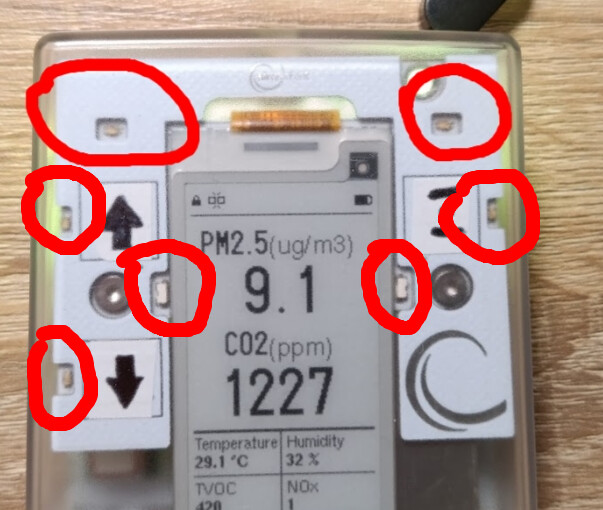
Currently, according to our hardware department, we have decided to remove all of the front LEDs as shown in the red circles:
I also see two front LEDs top left and top right, what are these for? As far as I can tell they have no functionality on the current firmware.
These two LEDs at the top have never been utilized. We decided to remove them, too (as shown above).
By the way, appreciate it a lot for your proposed scale. Since all the front LEDs will be removed, we might want to come up with a new idea in case we want to use the RGB LED to indicate CO2 level or something else other than PM2.5 AQI, which is already used in the current Go.
Hi @Tai_AirGradient , thanks for the info.
I think your decision to cancel the front LEDs makes sense.
You say it’s an RGB LED so you could potentially tune the colors a bit better so they are better distinguishable from each other?
I would still like to see more granularity below 800ppm.
What do you think of the following scale/colors for the three modes?
0-500 ppm / 0-3 µg/m³ / Score 10 = White
500-700 ppm / 3-8 µg/m³ / Score 9 = Light Blue (between saturated blue and white)
700-800 ppm / 8-11 µg/m³ / Score 8 = Saturated Blue (only the blue emitter)
800-900 ppm / 11-13 µg/m³ / Score 7 = Yellow
900-1100 ppm / 13-19 µg/m³ / Score 6 = Orange
1100-1300 ppm / 19-23 µg/m³ / Score 5 = Orange
1300-1400 ppm / 23-26 µg/m³ / Score 4 = Orange
1400-2000 ppm / 26-39 µg/m³ / Score 3 = Red
2000-3200 ppm / 39-64 µg/m³ / Score 2 = Purple
3200-4400 ppm / 64-88 µg/m³ / Score 1 = Red + Purple alternating
4400 ppm and above / 88 µg/m³ and above / Score 0 = Red + Purple alternating
2 Likes
Hi @Bart_Netherlands, thank you for the reply!
I think it should be possible to tune the color for those RGB LEDs, but let me confirm this again with our engineer.
Your proposed scales for CO2 and PM2.5 look nice, but do you think that could confuse people who also have the AirGradient ONE, since the color code is different?
For the GO IAQS score mode, anyway, I’m not sure if we can use any other colors than these three colors (blue, yellow (or orange?), and red) to comply with their standard, as these colors are discreetly designed as shown in the second image below.
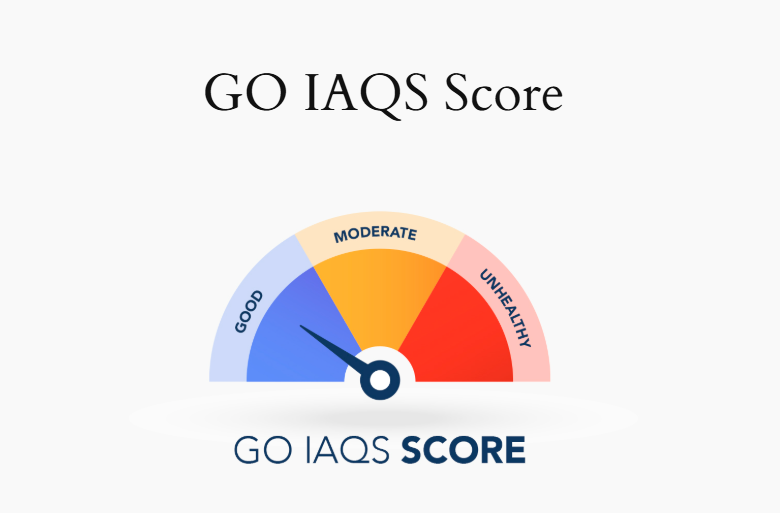
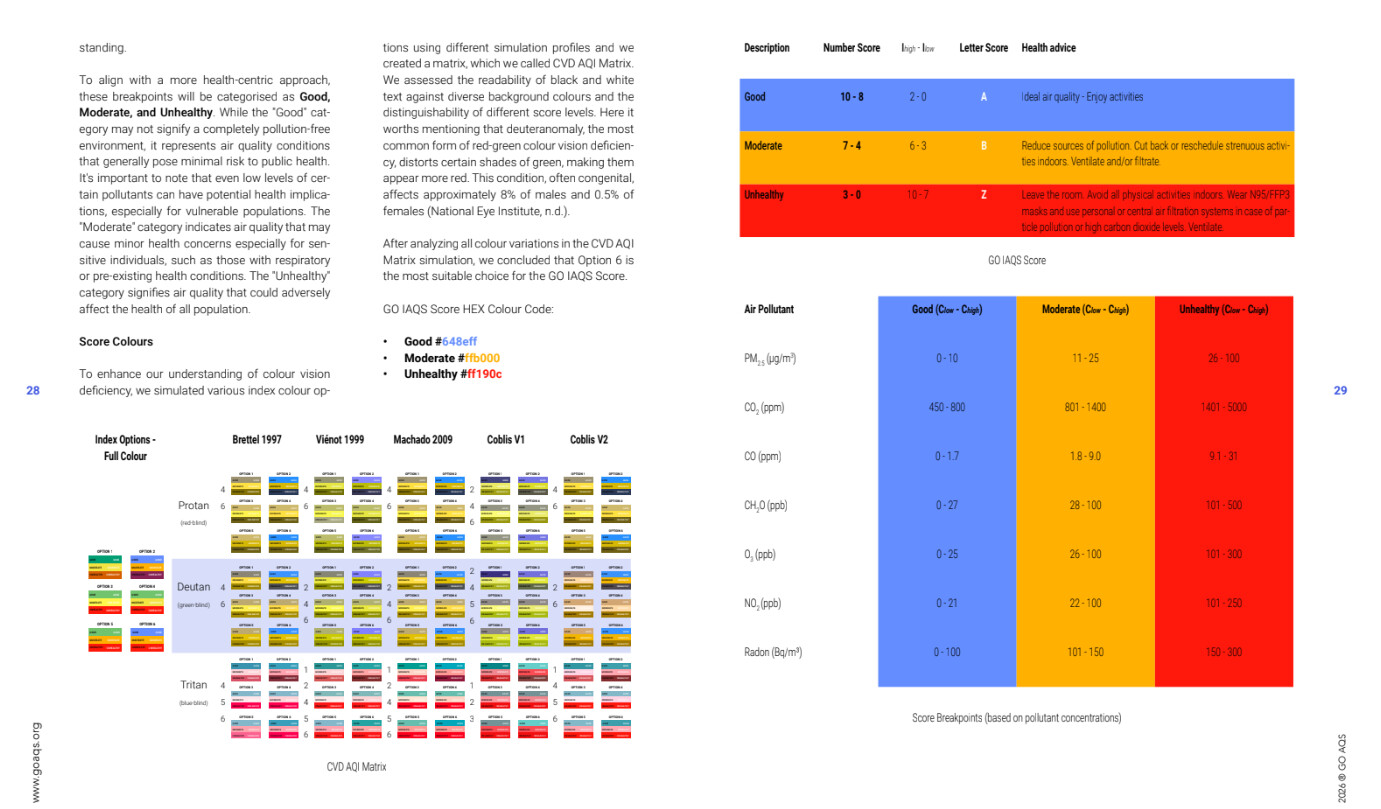
Source: Open Documents – GO AQS
Hi @Tai_AirGradient ,
If you think it could confuse people since the color code is different, what do you think about
White
Light Green
Saturated Green
for the first three steps of the scale?
I don’t really mind what the colors are, I would just like increased granularity at the lower end of the scale.
For the GO IAQS score mode, you’re right, I think you have to use those colors. So for that mode you can only use the three colors I guess. And of course show the score number on the screen.
I also thought about flashing the colors at different speeds like slow and fast to add granularity that way. But I think that would be too annoying and distracting. I think flashing only makes sense when the level/score is very unhealthy.
1 Like
Hi @Bart_Netherlands, hope you are doing well!
This scale looks promising, as it is more consistent with the existing AirGradient ONE CO2 Mode LED (except for the white, but I think that’s fine).
Flashing is also an interesting idea to explore, but I do agree that it could be annoying if it flashes all the time. Maybe only flashes when there’s a significant change in reading. For example, the LEDs flash for xx seconds when the CO2 reaches 800ppm (just a placeholder number), whether it goes up to 800 or down to 800. Just to grab the user’s attention. What do you think?
I have a SwitchBot Meter Pro CO2, and its LCD flashes the ppm number when it reaches the set threshold. I think it gets my attention quite well.
Using the rgb led of the go for visualizing CO2 is an awesome idea!
When I travel for business I take the go along and CO2 is really the only parameter I can do something about (by opening a window in the hotel or office) - I often check the display and you would be surprised what level of CO2 is present in many offices… a color indication would be really helpful, right now we have bad air quality in the room but the go is green because of low PM…
Knowing PM and NOC is fine but I cannot do anything about those.
Therefore a color indication for CO2 would be much appreciated.
IMHO green below 800 is fine and I don’t need many color levels, I can always check the display if i want to know more.
As a “compromise” between PM and CO2, why don’t you display both by using the worse air quality measurement. If there is bad air in the room I would like to know no matter if it’s CO2 or PM.
The best option would be a configuration parameter (via API/MQTT is fine for me) which measurement to include in the led status.
And honestly I dislike the idea about flashing.
Regards,
Mike
1 Like
Hi @Randomperson, thanks a lot for sharing about your real use cases and your honest opinion!
Regarding the ‘compromise’ mode you mentioned. Do you think something like GO IAQS satisfies this requirement?
Here’s what the GO IAQS is like:
We have the GO IAQS Mode for the LED and OLED display of the AirGradient ONE. However, for the Go, I am not 100% sure whether implementing this on the AirGradient Go is compliant. But let’s just discuss the idea. Do you think it’s a good idea to have the GO IAQS mode on the Go displaying the score on the e-paper display and using LEDs to display the color of that score (so we’ll have only 3 colors).
The GO IAQS score is a good start for the led color but why limit the LEDs to three colors? We have RGB and I would use that functionality.
Are those led plain rgb or addressable? Addressable (ws2812 and the likes) would open the possibility of „continuous“ color,
Regards,
Mike
Hi @Randomperson, since the Go IAQS Score is a standard that strictly requires these three colors (which means we’ll have to design a new color code and scoring system of our own if we want to use more colors).
Please let me confirm with our engineer about the LED type.
Hi @Tai_AirGradient ,
The white could be replaced with light green if you want to stay more consistent. But personally I like the addition of white for the lowest ppm. It feels natural to me as well as a scale: “white - light green - saturated green”.
I don’t like the idea of flashing at say 800ppm threshold. To me flashing only makes sense when the air quality is really bad.
I like the idea of a 4th LED mode (besides PM2.5, CO2 and GO IAQS): worst measurement mode of CO2 + PM2.5: Basically the CO2 mode scale and the PM2.5 mode scale, and it always uses one of the two, whichever is worse.
2 Likes
Hi @Bart_Netherlands, thank you for your suggestion!
Let me discuss this with our team. Will let you guys know when there’s an update.
In the meantime, please feel free to add anything you’d like to see. Thanks, guys!
1 Like
I couldn’t agree more. Leave AIQS as it i, maybe even as the default. And then led modes for CO2, PM and „worst of the two“
As for the values (i assume a standard rgb led and no PWM, so basic color only - otoh the go supports different brightness so PWM is available ?) I tried to be in line with the IAQS and the current eu and German recommendations.
CO2 scale: ppm
White 0-500
Blue 500-700
Cyan 700-800
Green 800-1000
Yellow 1000-1400
Red 1400-2000
Magenta 2000+
Being able to use more colors would enable more granularity the upper range (orange)
PM scale: ug/m3
White 0-2
Blue 2-5
Cyan 5-7
Green 7-11
Yellow 11-15
Red 15-25
Magenta 25+
Being able to use more colors would enable more granularity the upper range (orange)
I wouldn’t use green for 800-1000.
1000 is too high for good health, so this gives users a false feeling of a safe level.
From what I’ve read the consensus is that higher than 800 is not good for humans.
See for example this research article:
“Ventilation causing an average CO2 concentration of 1,000 ppm negatively affects sleep: A field-lab study on healthy young people”
https://www.sciencedirect.com/science/article/pii/S0360132323011459