I’m using a TIM HUB+ modem/router, given to me by my ISP.
Thanks! Could you try downgrading to 3.4.1 and let me know if the issue recurs on that firmware version?
Ciao a tutti!
Same issue here. I own either an Outdoor and Indoor monitor, respectively:
- Open Air (Model O-1PST)
- AirGradient ONE (Model I-9PSL)
Both the devices are running the 3.6.0 firmware.
Four days ago, timestamp 20/01/2026 06:00 CET, the Monitors disconnected from the Wi-Fi.
I noticed the AirGradient ONE was showing a red led on the top left part of the front panel and also a “no Wi-Fi connection” icon on the Display.
The power at Home was ok, the power chargers were ok (tested with a Smartphone), the Wi-Fi was ok (also tested with a Smartphone).
I waited several hours but nothing happened. Then I power cycled both the Monitors and they restarted to operate normally. After few hours they disconnected again and so on.
What could be the root cause of the issue?
Feel free to ask me in case of any info
Grazie mille
Could you try downgrading to 3.4.1 as well and let me know if the issue recurs on that firmware version?
Sure!
Is there any guide on:
- where to find the firmware
- how to safely update it
Thanks a lot
After one full day on 3.4.1, I got zero disconnections. It was doing it frequently on the latest firmware, so I think it will not anymore, thank you.
Is there anything else I can do to help you find out what the problem? In the meantime I will stay on 3.4.x
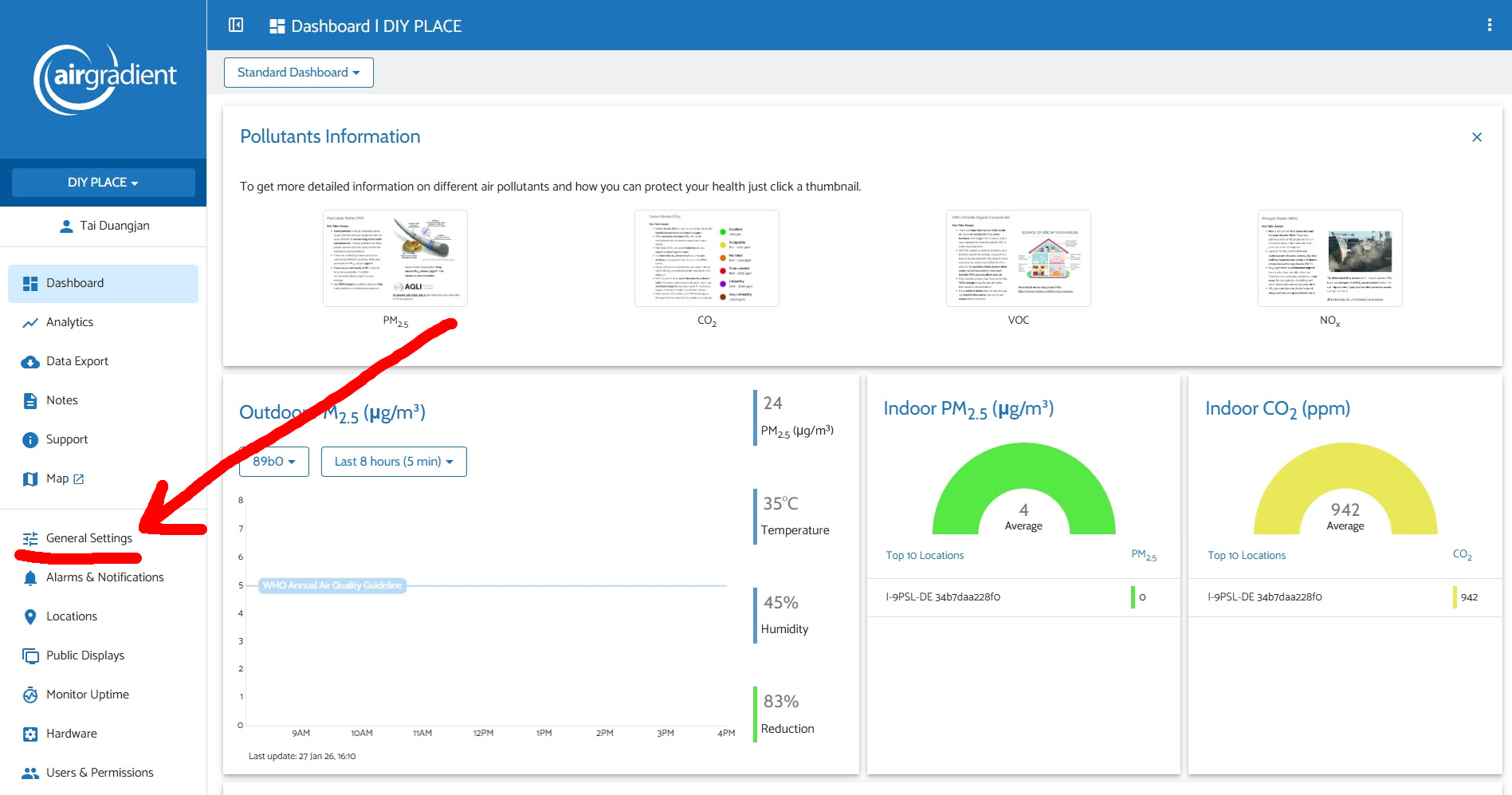
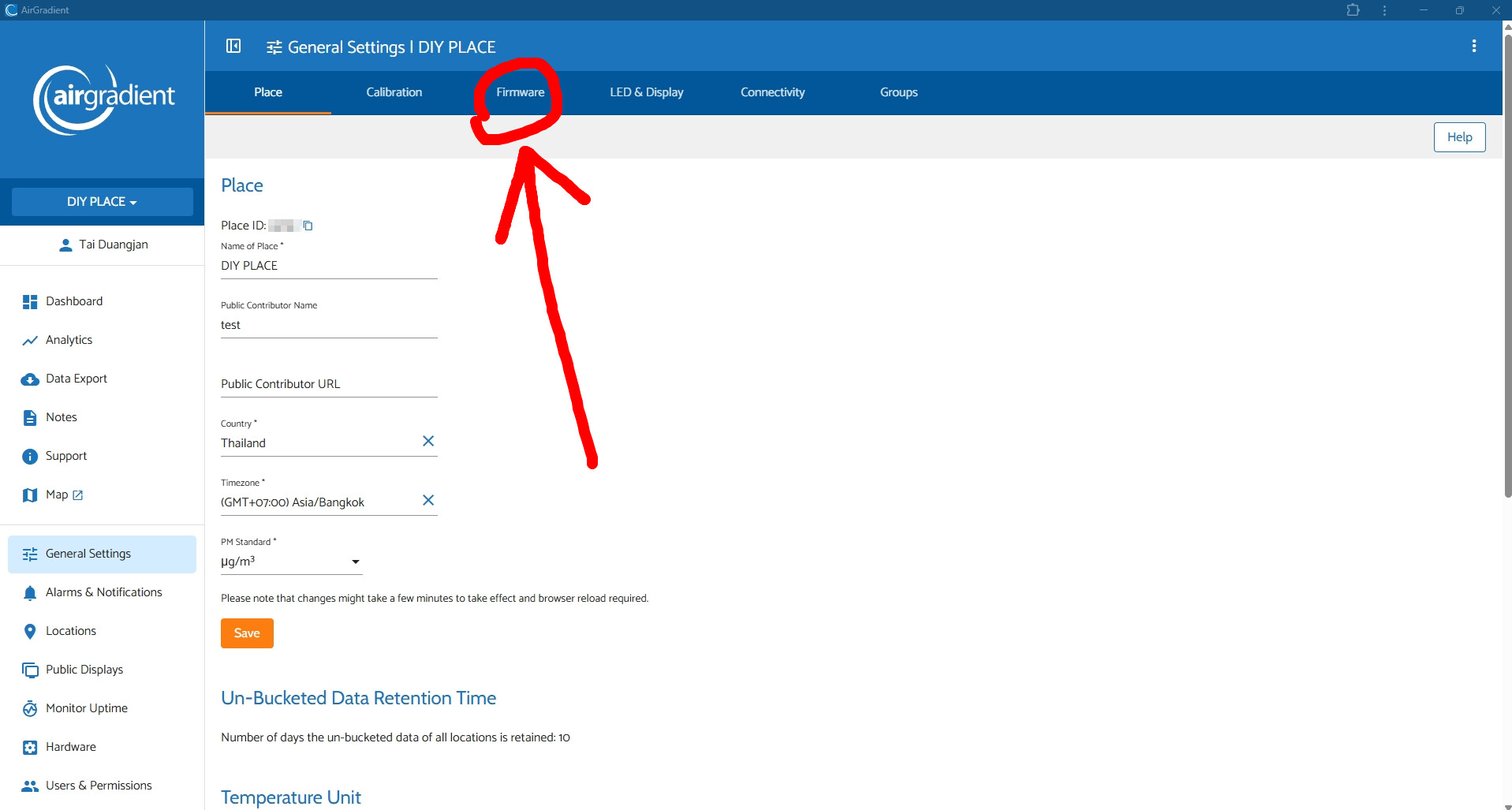
@Grynium If you go on the dashboard, under general setting you will see a “firmware” tab.
Here is a direct link to configure the firmware on the Dashboard:
https://app.airgradient.com/settings/place?tab=2
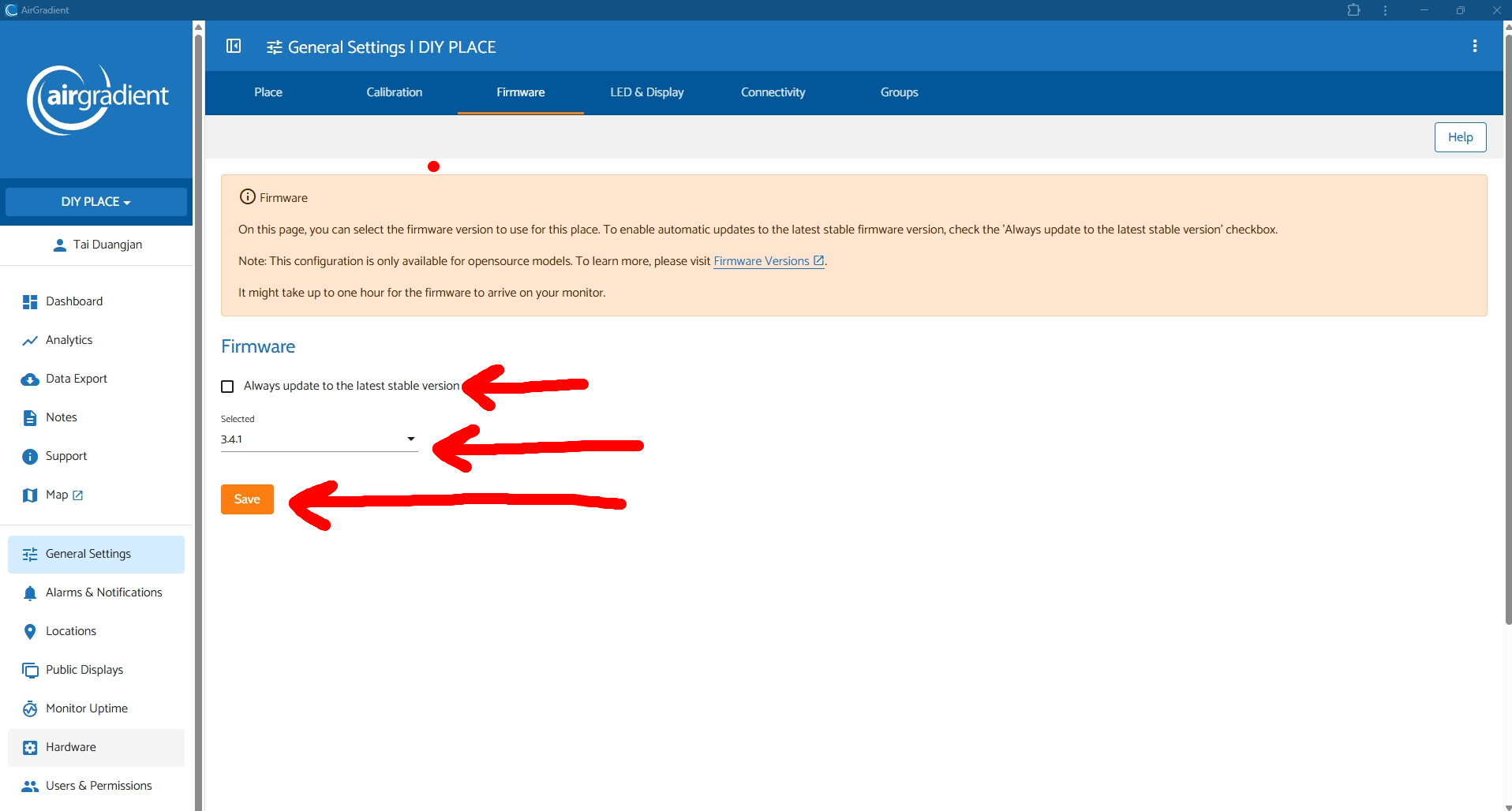
Uncheck the box and set it to 3.4.1 and once it is connected to wifi again, it should start a firmware change to the one you specify.
Several people have reported issues with 3.6.0 and Wifi including this on the Github page:
Regular Wifi disconnects after update to FW 3.6.0 · Issue #359 · airgradienthq/arduino
Thanks @Biiba! This will be reported to the team today/tomorrow as we’ve pretty much confirmed this as an issue on 3.6.0 and been able to reproduce the issue ourselves. I think we should have an update on this next week.
Ciao @Grynium !
Would you mind providing information about your network configuration (Wi-Fi router, access points, mesh, non-mesh, etc.)?
Thank you
As an additional tidbit, it looks like I am having this with 3.6.0 as well, but only with my outdoor, and only when the AP does it’s weekly restart. I have 2 AP’s in the house (same SSIDs), and never had a problem prior. I have them restart weekly - one at 5:00 AM, and the other at 5:15. The indoor sits between both, so can grab either. The outdoor does not - it only hears the one rebooting at 5:15, and does not recover. Reboot of an AP is 60 seconds or less, so not sure about timing . . . seems almost like when the AP reboots, the outdoor sees the weak signal from the other, and decides that it’s too weak, but never rescans to see it’s nearby AP come back. Other than during these restarts, both have been solid on 3.6.0 . . .
IP’s are static, assigned via DHCP from my Cisco firewall that serves all wired and wireless networks/VLANs in the house.
(AP’s are Netgear WAX220, AX4200 dual band)
O-1PST worked stable for me for 1 day, but on the 2nd day it started to go offline every 1 hour same time. I’ll try 3.4.1.
Network: Keenetic Mesh (Hero 2 + Sprinter 2)
UPD: After the downgrade, everything has been working stable for a day now.
Ciao @Biiba, @MallocArray,
thanks a lot for the hints on how to downgrade. I didn’t know it was so easy!
Please note before of downgrading I did a try with the configuration of my Router (Tai_AirGradient):
- TIM HUB+
- Model ZXHN H388X
I entered the configuration page, WLAN section, then noticed I had the WLAN configured as:
- Wi-Fi 2.4GHz&5GHz
- Band Steering ON
I checked the Spec Sheet of the two Monitors and noticed they do support:
- 2.4GHz IEEE 802.11 b/g/n-compliant
At the end I come up with the idea of temporary disable the WLAN (5GHz) and see what happens.
Please note so far I didn’t have any further disconnection (more than 48h uptime).
Could it be the FW 3.6.0 + Band Steering goes in a loop in which the WLAN (5GHz) is selected while the only WLAN (2.4GHz) is supported?
Thanks a lot for the support you all
I have the same issue on the 3.6 version of firmware that recently started. I’m using 3 FritzBox routers one is the master, the other two are linked to be a mesh over ethernet cables. It is linking to an access point further way, and then sometimes dropping and not reconnecting. The Fritz mesh has the wifi steering enabled to encourage devices to connect to the right AP or band. I didn’t have the issue until recently.
I’ve only got it connected to my Home Assistant, so not sure how to try downgrading the firmware.
This more or less echoes my setup and experience too.
Hi @smsm1 and everyone here. Thank you for reporting this to us. We are currently working our best to find out the cause of the issue.
In the meantime, you might want to try downgrading to the previous firmware temporarily.
To downgrade your firmware, you can follow these steps:
- Go to your AirGradient dashboard
- Click ‘General Settings’
- Click ‘Firmware’ tab
-
Uncheck the box ‘Always update to the latest stable version’
-
Select the dropdown menu to ‘3.4.1’
-
Click ‘Save’
After a few minutes, your monitor should detect that your dashboard has a new target firmware and will perform an OTA upgrade (downgrade) to the version you selected.
Note: If you don’t want to wait for a few minutes, you can also force the monitor to quickly detect the new target firmware by powering cycling your AirGradient monitor (unplug the USB-C and plug it back).
Hello, and many thanks for helping us all. Quick question — the dashboard assumes our AirGradient is connected to your cloud? If it’s not, then what options do we have for downgrading?
Many thanks!
Hi @drowsy !
You are right. AirGradient monitors connect to AirGradient’s cloud if you use the Dashboard.
In case you don’t use AirGradient Dashboard (only have the monitors connected to Home Assistant, for example), the most convenient way you can downgrade the firmware is connecting your AirGradient monitor to your PC and using our web firmware flashing tool (everything can be easily done via a web browser like Chrome): AirGradient ONE (I-9PSL), Open Air (O-1PST) and Open Air Max (O-M-1PPST...) Firmware Versions
You can watch a quick video guide here for the AirGradient ONE: https://www.youtube.com/watch?v=cxCt3U4qsZE
For the Open Air: https://www.youtube.com/watch?v=L6oY8jS-1Do
Please note that the latest firmware available for the AirGradient ONE/Open Air on the web flashing tool is v3.3.8.
I hope this helps!
That’s fantastically helpful! Many thanks 
My very pleasure!
And if you guys don’t mind, please feel free to provide a little more information about the issue here: Help Us with the Wi-Fi Issue of Firmware 3.6.0
I’ll make sure that it is our priority to fix this issue.
Thank you!
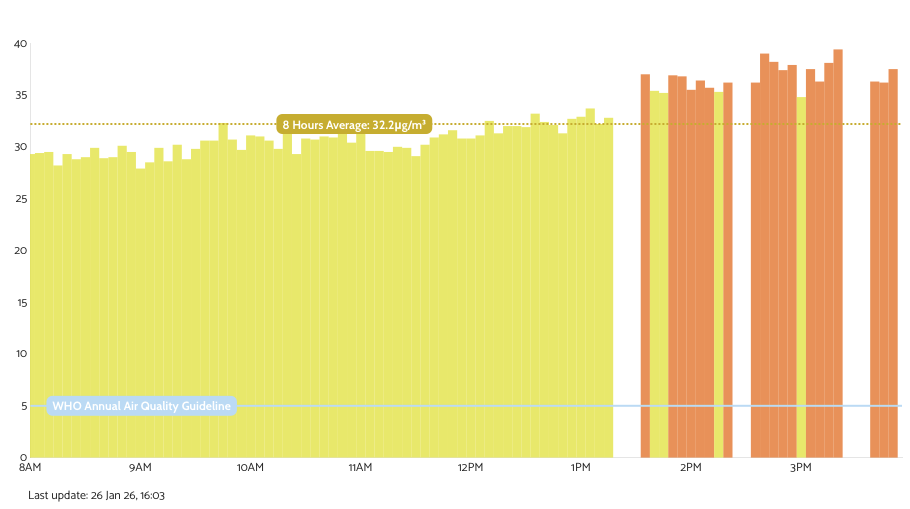
just went offline since 24 Jan 15:00 CET 
Curious fact it happened on both my Monitors (Outdoor and Indoor) at the same time.
I thought it was something about the 5Ghz and Band steering, it seems not.
Next step: I’ll give a try with an older version of the FW.
Thanks @Tai_AirGradient for your efforts!!