AirGradient Forum

How to "Stop sharing your data"?

I tried the menu choice to start sharing my data and made a few selections to see how it works. However, after starting to share my data I was not able to find the user interface to make any modifications in the selections I made - or to stop sharing my data altogether.

Do I just have a bad eyesight or does the user interface really disappear after one starts sharing his/her data?

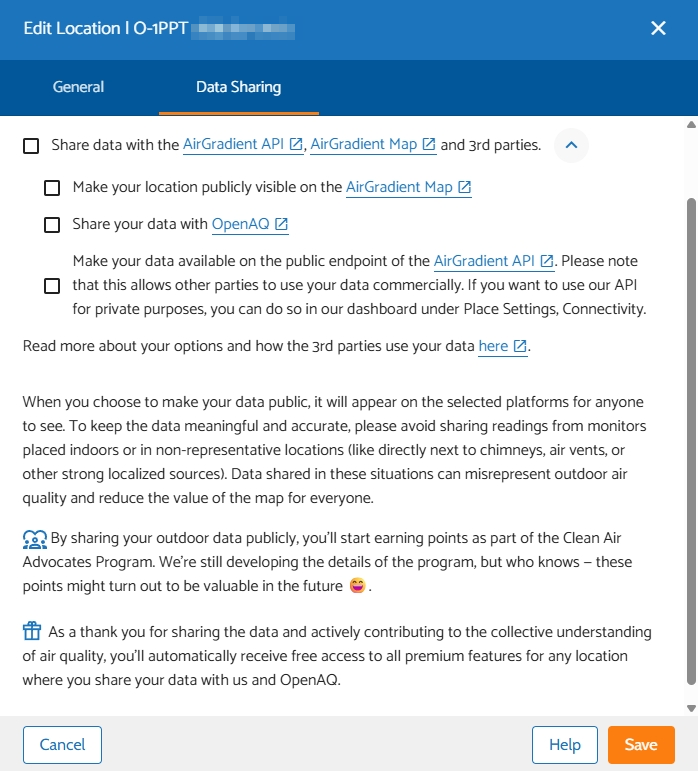
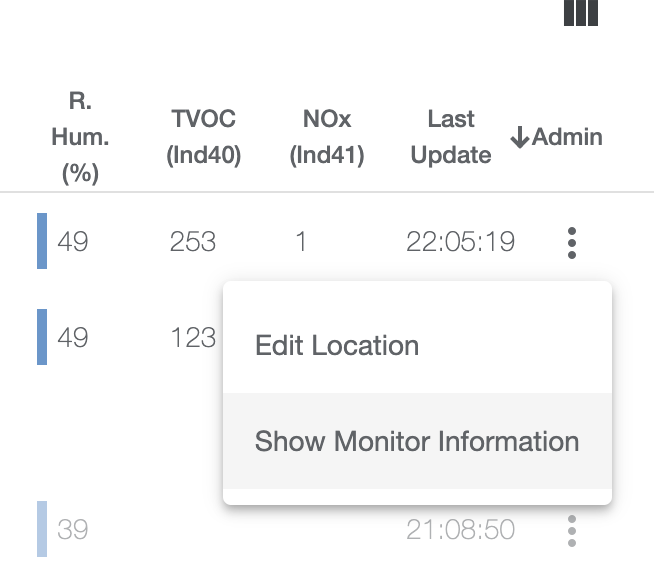
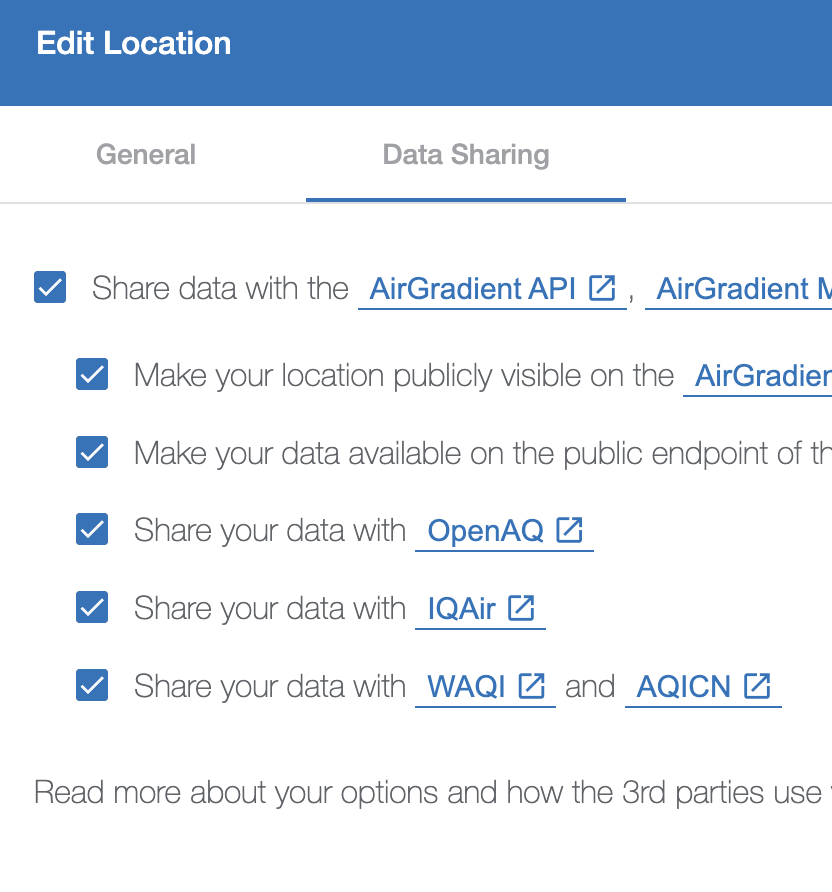
No, it’s not a disappearing UI. Just click on “Edit Location” on the action menu of your dashboard. Then there is a 2nd tab called sharing:

Then:

Ahh… there it is!

I enabled the data sharing using the “main menu” element (in the left panel) and that UI element seems to have disappeared after enabling data sharing. Now I understand that it seemed to be only a shortcut to this Data Sharing Tab.

Thank you for your quick reply!

Looking for that as well. I only see the tabs “General” and “Monitor Settings”, no sharing.

I’m happily sharing data from my outdoor monitor, but I somehow managed to also enable sharing for an indoor monitor - now two devices appear on the public map, and my indoor data is not really useful for other people, so I’d like to withdraw that.

By default, you can only share outdoor monitors. Can you please contact our support with the serial number of your monitor and ask the ticket to get assigned to Nick.

While I understand the historical and business reasons behind such a choice, having anything share user’s personal data without consent as a default is illegal in the EU under the GDPR…

Would be wise to re-think that default before someone in the EU (i promise it won’t be me ;)) ) files in a complaint, as the company would inevitably been fined for this.

Hi @gabu, we appreciate your concern.

We take it seriously when it comes to users’ personal data protection. AirGradient monitors, by default, won’t share their air quality data (your data will never automatically show up on the AirGradient Map, unless you opt in). You need to explicitly enable the public data sharing option to make it public, and you can opt out easily at anytime you would like.

More details about this: Data Ownership & Sharing

1 Like

Thanks for the clarification, i will look at this into great details.

Note that it is not the sharing to the public that is illegal without explicit consent, but also the sharing with a company.

I see that the airgradient one by default sends its data to the aigradient cloud. If this contains anything personal like an IP address and/or location data, it is already too much.

(i am actually in the process of making sure that when I first connect the device to my wifi network, it doesnt start uploading data to your company without my consent! that’s a journey…)

1 Like

It seems to me that

{"postDataToAirGradient": true}

is the default in the config?

Just a quick note. When you use the WiFi provisioning to setup your initial connection to your router there is a checkbox “never send data to AirGradient” (or similar). I think this is what you as looking for.

Sorry for the brief reply, I am just traveling with only my phone.

Yes I did that first thing when I associated it. I didnt actually try to intercept traffic to see if anything was transfered at all, as I decided to rather trust you :wink:

Yet after i clicked “never send data…” I noticed that the {"postDataToAirGradient": true} was still present in the config, when polling it through the http interface!

1 Like

Hi @gabu, let me do some checks with my monitors, and I’ll get back here real quick when I find something.

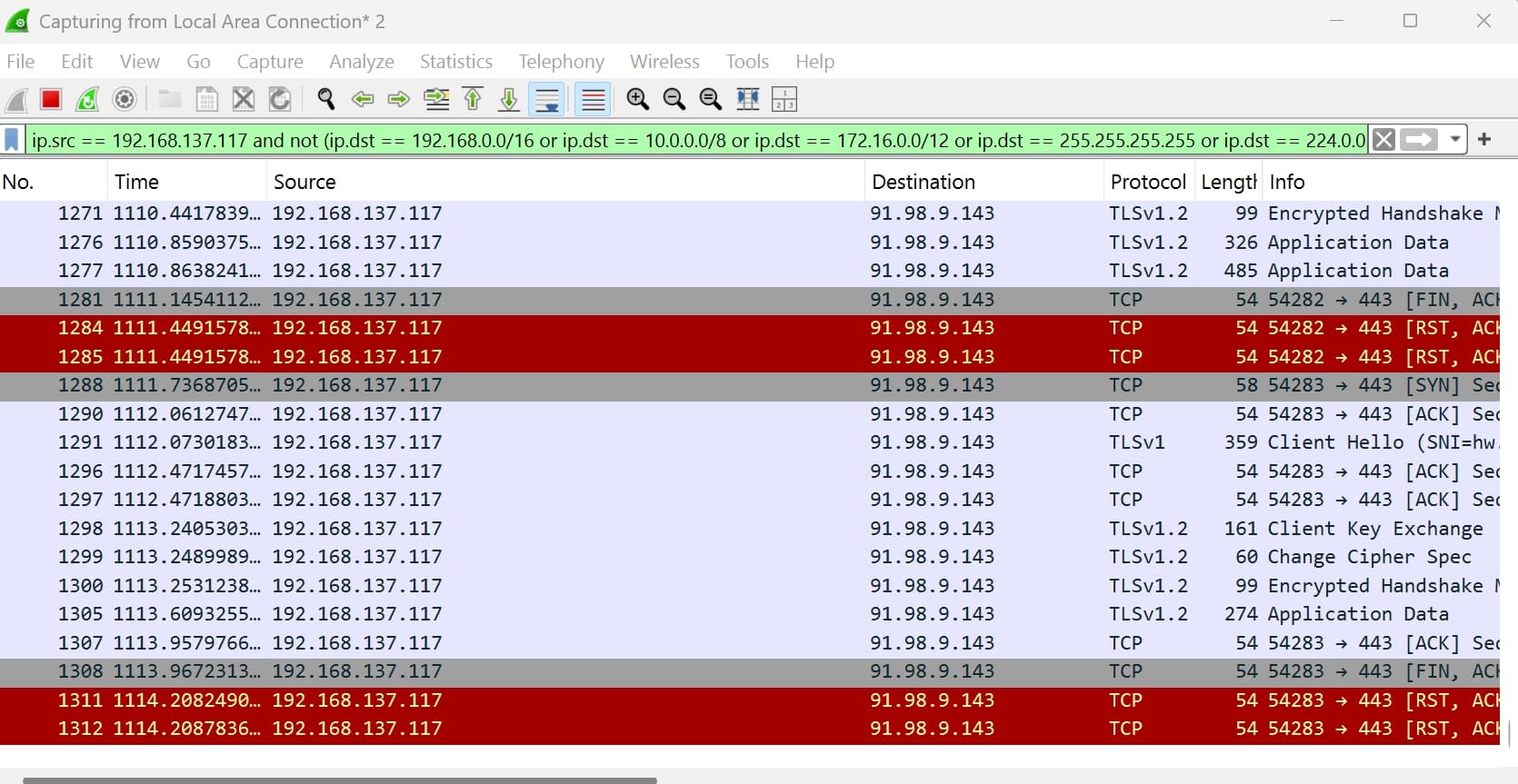
@gabu I’ve just tested it by connecting my AirGradient ONE to my PC Wi-Fi hotspot (which has an internet feed through the PC’s ethernet port), then capturing packets via Wireshark on the PC Wi-Fi hotspot network.

It’s a relief that in case of “Prevent Connection to AirGradient Server” was checked during the Wi-Fi set up process, I saw no connection from the AirGradient ONE to the AirGradient Server (which is good and expected). So when this is checked, no data is passed to the AirGradient Server, no cloud configuration is fetched to the AirGradient ONE, and no OTA firmware update. Everything is kept local.

This is the configuration when I check via the local API of the ONE:

{
  "country": "TH",
  "mqttBrokerUrl": "",
  "httpDomain": "",
  "configurationControl": "both",
  "pmStandard": "ugm3",
  "temperatureUnit": "c",
  "disableCloudConnection": true,
  "postDataToAirGradient": true,
  "ledBarBrightness": 100,
  "displayBrightness": 100,
  "ledBarMode": "co2",
  "tvocLearningOffset": 12,
  "noxLearningOffset": 12,
  "abcDays": 8,
  "model": "",
  "offlineMode": false,
  "monitorDisplayCompensatedValues": false,
  "extendedPmMeasures": false
}

Even it shows "postDataToAirGradient": true , there’ no data posted to the server (this could create confusion anyway).

Checking the box during the Wi-Fi setup is the only and absolute way to cut off all connections to the internet (or you can optionally block the WAN access of the AirGradient monitor on your Wi-Fi router, so it will be imprisoned in the local area network only and will never see the internet).

If the box is checked and you connect the monitor to your Wi-Fi, you’ll see it shows [16:03:26]Running monitor without connection to AirGradient server on the USB log.


By default (When no check on the “Prevent Connection to AirGradient Server” during the Wi-Fi set up process + "postDataToAirGradient": true + "disableCloudConnection": false ), when the monitor is running, you’ll see it communicates with the AirGradient server (which the IP address is 91.98.9.143)

To conclude that, if you would like to cut off the internet connection, have it worked only on you LAN, the easiest way is to reset your AirGradient monitor by pushing and holding the reset button for 10 seconds, the Wi-Fi setup portal will initialize and let you check the “Prevent Connection to AirGradient Server” box before connecting to your Wi-Fi.
Thanks for that thorough investigation and careful answer!

That great to hear, but it now means that in case “prevent connection…” has been checked, the presence of

  "postDataToAirGradient": true,

in the configuration of the device is confusing and misleading… something to be addressed for the sake of clarity only :wink:

Good to see that passionate people at Air Gradient take this matter seriously! :+1:

1 Like

@gabu I’m glad that my findings are helpful for you!

And yes, I agree, the presence of "postDataToAirGradient": true is confusing (even though it is actually overridden by “Prevent Connection to AirGradient Server”).

Let me ask @Samuel_AirGradient (our firmware engineer) if we can improve this.

Thank you so much again @gabu! Let me know if you have any questions or something else to share.

Hey there,

Now that this confusion has been dissipated, please keep this one thing in mind:

In EU the only acceptable default under GDPR is still opt-in. So user must actively make the decision to share data, rather than having them shared by default and having to make the active choice to opt-out.

In current configuration, some would argue that the airgradient configuration is still not compliant.

It would be as simple has having the unchecked box “share data with aigradient” (along with a nice mention saying "hey, we promise we will never ever share or sell these data, we are cool, we do open hardware, etc. so we think it’s totally cool if you share with us ;)) " or something friendly like this…

1 Like

Hi @gabu!

Thank you again for your kind and discreet suggestion. Please let me discuss this further with my team.

Interesting discussion. I think if we make the default “not sending data” many of our customers that want to use our dashboard will overlook this and then we would have them not understanding why they don’t see data on the dashboard and potentially become
frustrated etc.

@gabu
My understanding is that this automatic opt-in is actually allowed. GDPR is about HOW the data is used rather than how it is transmitted. Since we have a clear policy that the data is not used for marketing, AI, shared with 3rd parties without explicit approval etc, I think our approach is ok. But happy to discuss this further and do improvements.

1 Like

Hey Achim, thanks for your answer!

I do understand your point of view! It is legitimate (pun intended, see below), for sure.

Some would argue that what you describe is the “legitimate interest” of the company as it is necessary for the good functioning of the product. Problem is that it is what every advertisement, surveillance and otherwise “surveillance capitalism” company argues too. If they don’t collect without user’s consent, their business cannot function… if we go back to the history of the GDPR we for sure find strong lobbying from Google & co. to carve these exceptions out.

On the other hand, some would argue that your product doesn’t need to be transmitting data to function correctly. My own case and the existence of offline firmware would be evidence enough of that… But again these things would need to be tested in a court and a lengthy procedure, as i am not aware of any strong jurisprudence on the matter EU-wide.

The point is: consent is consent.

Sure some users would get confused… but i am assured, they would find abundant clues in the documentation and on this forum as to how to answer their questions.

Some efforts in UI/UX to make this choice absolutely visible (ie. confirmation box “are you sure you want to go on without enabling transmission of data? your device would function, but then you would miss on features X, Y, Z. Anyways if you do, get reassured, you can come back anytime to this dashboard to further enable it.”…) and/or a dedicated sticker, or warning/bold section of the cute card you slip with the product, etc.

Consent cannot be sacrificed because an information about it would get lost, as consent also thrives through a culture that must be built every day by privacy enthusiasts and virtuous actors like you.

1 Like

@gabu Thanks again for your suggestion, I hope you don’t mind me adding something before @Achim_AirGradient get back to you.

I agree that improving UI/UX is worth considering. We might need to create a sweet spot (in terms of UI/UX design) where people who want to use our cloud platform (AirGradient Dashboard) and people who don’t want to rely on our cloud platform are explicitly informed of their choice. Anyway, I think we are quite cool to some degree that we have a choice to check the box in the initial setup to prevent the AirGradient server connection. But I see your point that something could be improved, could be more convenient, or less confusing (for example, what is shown in the configuration we discussed above).

There’s a fun fact about the check box anyway, we have a number of users who reported to us that their device didn’t show air quality measurements on the AirGradient Dashboard. Then we asked them and found that they checked the “Prevent Connection to AirGradient Server” box in the initial Wi-Fi setup because they didn’t notice what was stated there (perhaps, because people were accustomed to what a typical company would do to force users to check all possible boxes before they can use the product). This is what we could improve, as you suggested through UI/UX.