AirGradient Forum

HomeAssistant addon wrong PM values when Airgradient dashboard is OK

Thanks, @Samuel_AirGradient.

Here is the output of /config from my monitor:

{
  "country": "TH",
  "pmStandard": "ugm3",
  "ledBarMode": "pm",
  "abcDays": 8,
  "tvocLearningOffset": 12,
  "noxLearningOffset": 12,
  "mqttBrokerUrl": "",
  "temperatureUnit": "c",
  "configurationControl": "local",
  "postDataToAirGradient": true,
  "ledBarBrightness": 100,
  "displayBrightness": 100,
  "offlineMode": false,
  "monitorDisplayCompensatedValues": false,
  "model": "I-9PSL-DE",
  "httpDomain": "",
  "disableCloudConnection": false
}

I have never used the dashboard so I can’t compare it to that / don’t know how to find that - is there a link to documentation about this? I can’t seem to find much beyond initial setup documentation on the website.

In any case, I’m trying to compare HA (via the the local API, I’m assuming) with the values displayed on the LED of the device itself, so I guess the dashboard might not be relevant (unless that actually configures the device display as well?).

This should help

Check out Set Configuration Parameters.

Looks like you want to set your display to show the compensated values and you may want to enable the compensations, as it is recommended.

The Dashboard is both for viewing graphs but it also does all of the configuration of your ConfigurationControl is set to Cloud. This makes it easier to see and set your config.

When you add to Home Assistant it changes the Configuration control to local so HA can configure the setting all locally or you can use Curl.

So it depends on how you want to manage it.

You can use the dashboard and cloud control and still get local graphs in Home Assistant

2 Likes

Thanks!

I have now set “monitorDisplayCompensatedValues” to “true” in “/config”, and will check using “/measures/current” if I see any further discrepancies, but it sounds like this was what I was missing - i.e. the device display was showing the raw values while the HA entities were using the compensated values.

If this was my issue, I would suggest that “monitorDisplayCompensatedValues” is set to true by default, or perhaps it’s added as something that people might want to configure when they integrate with Home Assistant in the HA documentation here:

Better still, it could be configured automatically by the integration, maybe as part of the “config flow” setup in HA with a (default ticked) checkbox to “show matching compensated values on display” (or something along those lines) and the same option being made available to set/change in the HA device page for the AirGradient (i.e. like the “Post data to Airgradient” option in the Configuration on the device page, there would be a “Show compensated values on monitor display” checkbox as well).

PS: It would be useful if the local server API documentation was linked from the main AirGradient website, perhaps on this page:
https://www.airgradient.com/integrations/

Following up on this as I must still be missing something (maybe the “corrections” object?); I have “monitorDisplayCompensatedValues” set to true in /config, but I’m still seeing inconsistent values between the physical display on my AirGradient device, the Home Assistant entity and even those reported on /measures/current.

For example, here were the values I observed earlier today for PM2.5 (ug/m3):

  • device display: 18; Home Assistant: 11.02; /measures/current: “pm02” 18.17 “pm02Standard” 18.17 “pm02Compensated” 11.19
  • device display: 21; Home Assistant: 11.82; /measures/current: “pm02” 18.33 “pm02Standard” 18.33 “pm02Compensated” 11.27

It appears that the device display is generally closer to the “raw” or “standard” (uncompensated?) values, whereas HA is closer to the “compensated”, but it doesn’t align perfectly and the inconsistency between the device display and HA makes me question which one I should use as they can’t both be correct. In any case, I would suggest that the default behaviour should be that the (main) HA entity matches what is shown on the device display, and if there are other values (raw/compensated/etc.) they can have separate entities in HA.

Following up again on this (prompted by the “Works with Home Assistant” announcement: AirGradient Is Now Works With Home Assistant! Congratulations on that BTW!) - any thoughts on the discrepancies I continue to see? Should I cross-post it to the official Home Assistant integration GitHub?

Any further thoughts/ideas on this?
I noticed this thread which sounds similar:

My “Configuration source” in the Home Assistant integration for my AirGraident ONE is set to “Local”, should I set it to “Cloud”? (even though I only use the device via Home Assistant and by looking at the screen on the AirGradient ONE device itself)

If you have configured it in the AirGradient Dashboard site, then changing your HA configuration source to Cloud will pull the configuration from the cloud, which can then more easily apply the corrections.

If you don’t want to use the AirGradient Dashboard, then you have to make a local API call to turn on the desired directions.

There are some details in the GitHub repo about using the local server. [quote=“alextwe23, post:26, topic:3618, full:true”]
Any further thoughts/ideas on this?
I noticed this thread which sounds similar:

My “Configuration source” in the Home Assistant integration for my AirGraident ONE is set to “Local”, should I set it to “Cloud”? (even though I only use the device via Home Assistant and by looking at the screen on the AirGradient ONE device itself)
[/quote]

1 Like

Very complicated thread! I also had trouble with different numbers on the AirGradient Dashboard, Home Assistant and AirGradient One Monitor Screen. I have a simple solution. Comments above may be correct, but include things like “local API call” and “GitHub repo” which are beyond my expertise and patience with setting up a simple device. So for any who want a simple solution here goes: First realize that calibration can be done online using the online AirGradient Dashboard. First, integrate the AirGradient monitor (AG1) into Home Assistant (HA). Next configure the AG1 (the monitor) in HA to post data to AirGradient and set the Configuration Source to Cloud. Next set up an AirGradient online account with the AG1 monitor. Calibrate the AG1 monitor in the AirGradient Dashboard (in the cloud). After some time all numbers were roughly the same for me. (PM0.3 particle number bounces around so 30 particles in HA is within tolerance of 35 on the Airgradient Dashboard and PM2.5 of 0.3 in HA is within tolerance of 0.2 on the Airgradient Dashboard and 0 on the AG1 display.) Now if you want, use HA to set the AG1 configuration back to local and turn off Post data to Airgradient. Your data is now local and HA will show the same numbers as the AG1 display. The numbers roughly correspond with the numbers on another monitor I have. The AG1 is not an expensive reference monitor and changes in the numbers are more relevant than the absolute values for me. So this is good enough - in fact it’s great!

1 Like

Thanks, @MallocArray , @Buzzer , for the responses.

I think I’m starting to understand it a bit more now - by default the sensor values shown on the physical device screen have “corrections” applied of some kind, and by default the sensor values queried by the local API for Home Assistant integration might also have “corrections” applied but these may or may not be the same configuration of “corrections”.

So one simple way of syncing the configuration of these “corrections” is by using the AirGradient Dashboard (which will change what is shown on the physical device screen) then setting the AirGraident Home Assistant integration to follow this “Cloud” configuration source.

As I don’t use (and have never set up) the AirGradient Dashboard, is there another way I can “query” for the “corrections” used for the values shown on my physical device screen so I can apply these same “corrections” to the values used for the sensor entities in Home Assistant?

(Ideally I would propose as a feature request another option for “Configuration source” in the HA integration to be “Device” to match the device screen, and suggest that this is made the default to avoid this confusion for future users.)

The way to enable the corrections without using the Dashboard site would be to make local API calls to your device using something like curl
You can read more about the different configuration parameters here:
https://github.com/airgradienthq/arduino/blob/master/docs/local-server.md#set-configuration-parameters-put

You would want to change the option to enable the corrections on the display, and then you’ll also want to enable the PM 2.5 corrections using the section just below:
https://github.com/airgradienthq/arduino/blob/master/docs/local-server.md#corrections

I feel the Configuration Source is still accurate, as you aren’t using the Cloud server, but you are using the Local device for configuration, so Local is still correct. But all that does is control if your local API calls are able to configure the device, or if it gets the configuration from the Dashboard page in the Cloud.

The easiest is to use the Dashboard and set it to Cloud for the Source as it will default to having the EPA corrections, but you’ll still likely need to figure out the batch specific corrections which as far as I know will require you to open the device to read the batch label on the PM2.5 sensor itself.

1 Like

Hello,

I have the AG1 indoor running for 2 weeks or so and noticed the same issue today. The values shown in the online Dashboard correspond with the values shown in the dashboard for PM2.5. However, in HA, the do not at all.

I honestly do not want to spend hours to try to understand the issue, but would actually hope there is or will be a bugfix for this asap. Even though the AG1 is inexpensive compared to high quality reference sensors, it still comes at a price. I am only using HA, bought the device because of the advertised HA integration and won’t even be logging into the dashboard in a year. Please correct me if my expectation towards correct data in HA is wrong or addressed to the wrong people

Attached a screenshot. Please not that the difference there is not to huge, but still there. But there are cases where the PM2.5 is 25 on screen and dashboard, but only 15 in HA

1 Like

What to do if AIrgradient Dashboard says that PM2.5 is 9, HA says - 9, but display shows 15? At same time, in HA PM10 also similar to data displayed on the screen under pm2.5 label?

Hi @Maksym_Koretskyi,

Could you please visit http://airgradient_xxxxxxxxxxx.local/measures/current (please change xxxxxxxxx to the serial number of your AG monitor) on a device that’s connected to the same network as your AirGradient monitor?

On that page, could you let me know if the pm02Compensated shows the same values that are shown on the device screen?

{“pm01”:7.5,“pm02”:17.83,“pm10”:18.5,“pm01Standard”:7.5,“pm02Standard”:17.83,“pm10Standard”:18.5,“pm003Count”:808.67,“pm005Count”:676.33,“pm01Count”:135.67,“pm02Count”:10,“pm50Count”:2.33,“pm10Count”:0.83,“pm02Compensated”:12.01,“atmp”:25.35,“atmpCompensated”:25.35,“rhum”:35.82,“rhumCompensated”:35.82,“rco2”:989,“tvocIndex”:62,“tvocRaw”:31774.42,“noxIndex”:1,“noxRaw”:18885.75,“boot”:1107,“bootCount”:1107,“wifi”:-51,“ledMode”:“co2”,“serialno”:“d83bda1b41a8”,“firmware”:“3.6.0”,“model”:“I-9PSL”}

So,
“pm02Compensated”:12.01
Screen shows PM2.5 : 18
HA shows PM2.5: 12

A belated thanks for the links to the documentation - very useful.

I noticed the discrepancy a few times again recently so tried to note down the values on the AirGradient display, Home Assistant and the local API (/measures/current):

Time Display: PM2.5 HA: PM2.5 API: pm02 API: pm02Standard API: pm02Compensated
2026-02-10 12:36:12 34.67 38.83 21.03
2026-02-10 12:36:26 20.68
2026-02-10 12:36:44 36
2026-02-10 12:36:58 25.40
2026-02-10 12:37:06 34.67 38.17 21.04
Time Display: PM2.5 HA: PM2.5 API: pm02 API: pm02Standard API: pm02Compensated
2026-02-10 14:01:41 6.15
2026-02-10 14:01:46 10.33 10.33 6.15
2026-02-10 14:01:52 10
2026-02-10 14:01:58 9.83 9.83 5.89
2026-02-10 14:02:07 6.15
2026-02-10 14:02:21 11
2026-02-10 14:02:26 11.67 11.67 6.85
2026-02-10 14:02:30 7.12
2026-02-10 14:02:45 13
2026-02-10 14:02:49 7.12
2026-02-10 14:02:56 13.17 13.17 7.65
2026-02-10 14:04:06 9
2026-02-10 14:04:12 9.33 9.33 5.65
2026-02-10 14:04:17 7.38
Time Display: PM2.5 HA: PM2.5 API: pm02 API: pm02Standard API: pm02Compensated
2026-02-11 12:35:51 12.17 12.17 6.88
2026-02-11 12:36:08 6.19
2026-02-11 12:36:16 12.83 12.83 7.25
2026-02-11 12:36:21 13

From this it appears that:

  • The Display value on the device screen is consistent with/closest to the local API value for pm02 or perhaps pm02Standard (it is hard to tell which as these are usually the same).
  • The HA value is closest to the local API value for ‘pm02Compensated’.

This is despite my config (/config) having "monitorDisplayCompensatedValues": true,:

{
  "country": "TH",
  "pmStandard": "ugm3",
  "ledBarMode": "pm",
  "abcDays": 8,
  "tvocLearningOffset": 12,
  "noxLearningOffset": 12,
  "mqttBrokerUrl": "",
  "temperatureUnit": "c",
  "configurationControl": "local",
  "postDataToAirGradient": true,
  "ledBarBrightness": 100,
  "displayBrightness": 100,
  "offlineMode": false,
  "monitorDisplayCompensatedValues": true,
  "model": "I-9PSL-DE",
  "httpDomain": "",
  "disableCloudConnection": false,
  "extendedPmMeasures": false
}

But might be because it has no corrections configured?

I think if I could work out which “corrections” are being used for pm02Compensated and apply them to my config, the Display should then pick them up and be (more or less) in line with the HA value?

@Ethan_AirGradient
Is my understanding correct or am I still missing something?

Ideally (as mentioned before) from a UX perspective:

  1. the default value for PM2.5 used for the HA integration should match that on the Display screen;
  2. the “corrections”/calibration should only need to be applied once, and reflect across both the Display screen, the local API and the default value for PM2.5 used for the HA integration.
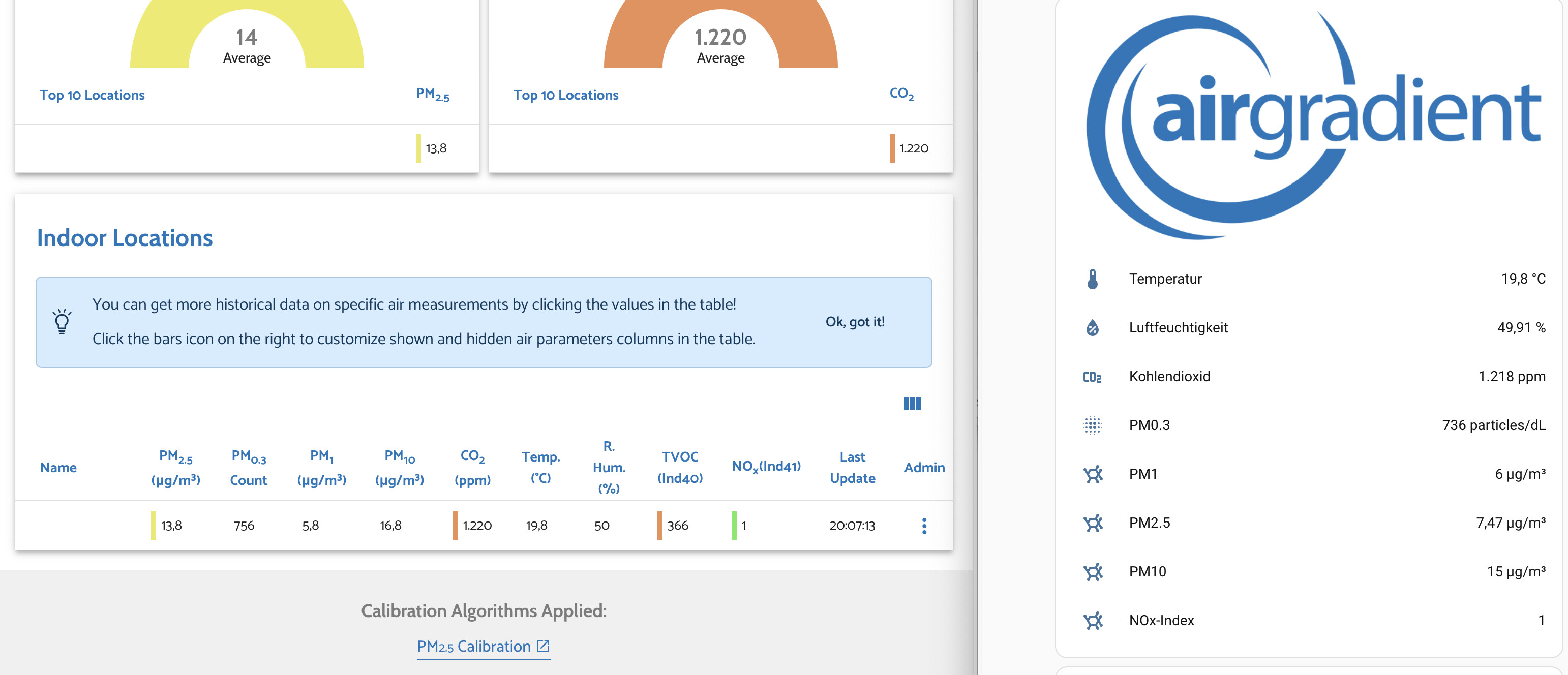
This looks similar to what I’m seeing:

  • Screen matches API pm02 (or perhaps pm02Standard);
  • HA (more or less) matches / is consistent with pm02Compensated.

You could try setting the corrections manually via the local API

That is, if you don’t want to consider connecting to the Dashboard with Cloud control.

Thanks; trying to follow the instructions it looks like I would need to unscrew the cover to check the sensor batch number, then look up the right “corrections” to manually apply?
https://www.airgradient.com/documentation/calibrate-low-pms-sensors/

To be honest, this all seems a bit overkill - I’m just trying to get the same numbers to appear on HA as on the Display (which as already mentioned, from a UX perspective should be the default situation), didn’t really expect a rabbit-hole involving partially disassembling my device…

Also, I’m not sure I understand how applying these corrections will apply to both the HA value and the Display value, given that my configuration suggests it should already be using the “compensated” values but this doesn’t seem to correspond with the compensated values from the local API.

Anyway, thank you again for all the pointers and if I have some time over the weekend I’ll give it a go and report back.

1 Like

What I’m finding odd is that in your listed output for the /config page doesn’t show any “corrections” section.

But your table showing measurements have different values for the API pm02 and pm02Compensated values, so it seems like something internally is applying some of a correction, but seems like it isn’t setup as properly as it should. I suspect this is why you are getting discrepancies between what the display thinks is the corrected values and what the API shows as the compensated values.

Another odd thing to me is that your compensated values are often lower than the raw, and I thought with the more recent sensor batches the issue was that PM2.5 was underreported raw and the corrections brought them up when they are below somewhere around the 30 values, but I’m not on the research team and am not in tune with all of that.

TLDR, to my eyes, it looks like you have the unit set to display compensated values, but no compensated values are set, and that leaves you in a mixed state that results in some values being raw and some being a compensation that is undefined.

2 Likes

OK; I think I’ve applied the relevant corrections for my sensor batch (PMS5003_20240104), i.e. running this command (from the link you provided) for my device:
curl --location -X PUT 'http://airgradient_84fce612eff4.local/config' --header 'Content-Type: application/json' --data '{"corrections":{"pm02":{"correctionAlgorithm":"slr_PMS5003_20240104","slr":{"intercept":0,"scalingFactor":0.02896,"useEpa2021":true}}}}'

The output of my /config now includes a "corrections" block:

{
  "country": "TH",
  "pmStandard": "ugm3",
  "ledBarMode": "pm",
  "abcDays": 8,
  "tvocLearningOffset": 12,
  "noxLearningOffset": 12,
  "mqttBrokerUrl": "",
  "temperatureUnit": "c",
  "configurationControl": "local",
  "postDataToAirGradient": true,
  "ledBarBrightness": 100,
  "displayBrightness": 100,
  "offlineMode": false,
  "monitorDisplayCompensatedValues": true,
  "model": "I-9PSL-DE",
  "httpDomain": "",
  "disableCloudConnection": false,
  "extendedPmMeasures": false,
  "corrections": {
    "pm02": {
      "correctionAlgorithm": "slr_PMS5003_20240104",
      "slr": {
        "intercept": 0,
        "scalingFactor": 0.02896,
        "useEpa2021": true
      }
    }
  }
}

I’ll look out for the next time the PM2.5 Display value is not zero and try to capture the various values again for comparison.

2 Likes