AirGradient Forum

Airgradient Outdoor in Zombie Mode

Hi, I’m have been a longtime user of both an indoor and an outdoor device. Both units are updated automatically. Both have started to disconnect from WIFI a few months ago for short periods of time, but that has stopped: the indoor unit is stable, but the outdoor unit did not connect at all. The LED on this unit (v1.3) was off.
I thought it had a bad USB cable, there were visible signs of wear, so I have reconnected it with a known good cable to a new power supply and the led began flashing two short flashes, but it did not want to connect to my WIFI.
Instead it went into AP mode and I could connect to it, but only for brief periods. I could try to install a firmware image, but I have not found any on the homepage.
If I didn’t try to connect to it via WIFI, the flashing started with 2 short flashes, then some time went by and it changed to 3 flashes, then I believe it rebooted itself, so this process repeated itself.
Now after many failed attempts (I can’t explain why those were unsuccessful) I have managed to connect via USB reflashed the board, reset it, connected to it via WIFI, set my WIFI password. Now it seems to connect over the WIFI and everything is working.
So now I hope it will stay stable.

I started this mail before I had succeess with reflashing, but now I think it might be of some value to other users experiencing similar issues. I also wanted to ask if someone else had similar issues?
1 Like

Sounds like you found the firmware, but this is one of the pages for reference

https://www.airgradient.com/documentation/kb/kb-firmwares-airgradient-one-i-9psl-open-air-o-1pst-and-open-air-max-o-m-1ppst-firmware-versions

2 Likes

@Petrus I appreciate it a lot for sharing this on our forum. The firmware will trigger a reboot every 180 seconds if the monitor doesn’t connect to a Wi-Fi network. But for the issue you have encountered, a clean reflashing of the firmware (with ‘Erase device’ box checked when flashing via our firmware page) usually fixes the issue.

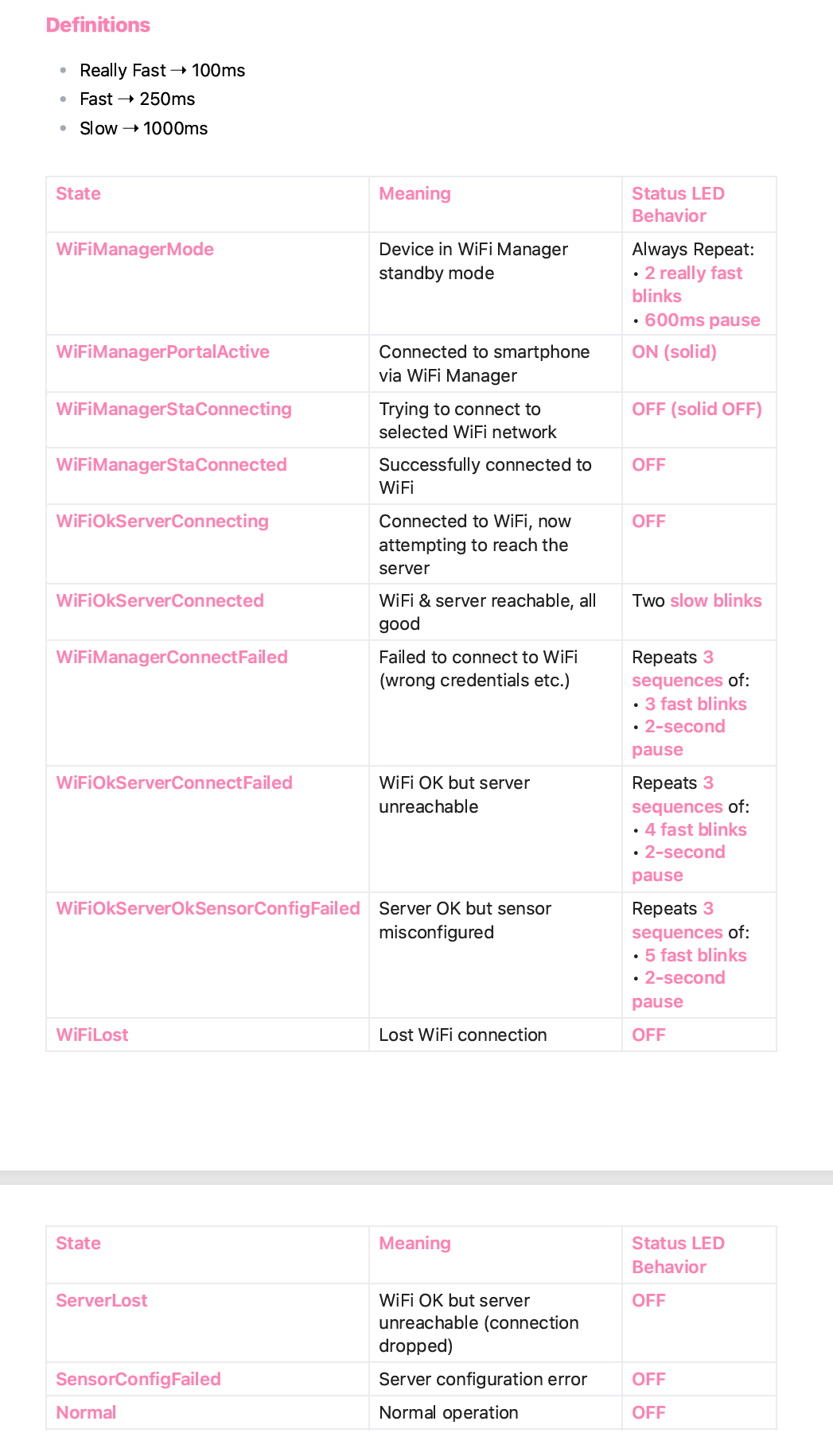
I’d like to add this info about the definitions of each LED indicator status in case it is helpful for you and people who read this post:

And thank you, @MallocArray again for providing the link to the firmware page.

We have been improving our knowledge base and content management system. For those who’d like to find resources for a quick troubleshooting, you can now use a search bar in https://www.airgradient.com/support . Please feel free to let us know if you cannot find what you want (we will write more articles to cover it).

1 Like

Thanks to you and to @MallocArray !

Peter

1 Like

Hi @Petrus , does flashing the firmware fix the issue? Please feel free to let me know if there’s anything I can help.

Hi Tai!
Well, I had no issues since. But previously, the issues came and went irregularly. A reboot mostly resolved them for a few days/weeks, until I got into that reboot loop. That state did not reappear, but if I will have any outages, only time will tell. I will report it if I encounter those issues again. I will be confident after a few weeks of undisturbed operation.

BR

Peter

2 Likes

Hi @Petrus , glad to hear that! Please feel free to let us know if the issue persists. Thank you.

Interesting! I will try the same! I stopped using mine as I found the WiFi disconnects were annoying but bearable, until suddenly it never connects despite my best efforts. Fingers crossed it bring it back to life as I had researched adding external antennas and all sorts

1 Like

Hi @cjcharles - sorry to hear about this. A clear firmware reflash will usually help but if the issue persists - feel free to let us know - we’ll do our best to help!