My new airgradient one (with latest firmeware) seems to be working fine except for one issue. Currently we are experiencing a lot of wildfire smoke, and have been for days. I decided to compare it to outside Purple Air (which uses same PM detector) by putting my unit outside for several hours. I have it set for lights to display PM2.5. The outside reading stablized at 17. Purple Air maps show several units in my neighborhood at 98-104. I ran this test seveal times and got similar results. Inside my house, with air filters running, Airgradient One shows below 12 (3-9). My serial is a0f262da16b0. Why are these measurements so far off? Is there something wrong with my Airgrandient One?
Hi @rgp1942 , are you comparing the PM2.5 concentration in ug/m3 from the AirGradient ONE with the US AQI value shown by PurpleAir? Those are different scales.
Could you share a screenshot of the PurpleAir readings you are comparing against?
We also have a guide that explains the measurements shown in the Dashboard and how to interpret and compare them:
https://www.airgradient.com/documentation/kb/airgradient-dashboard-measurement-and-interpretation/
1 Like
I don’t think Purple Air measures AQI as that is an amalgam of several different metrics, including gases. Purple Air devices only measure PM2.5. I guess we will never know why Airgradient One indoor will never agree with Purple Air outdoor devices, even though both use the exact same sensor.
AIRGRADIENT MANAGEMENT:
There really needs to be a smartphone app that talks directly to the Airgradient One for doing settings/configurations and readings that aren’t on the screen. Having to connect to the internet, and then use the online dashboard is very convoluted/complicate/confusing and not user friendly. It took me many hours over two days to make this happen. An app that talks to the device would be much simpler!
I have a Purpleair Flex (outdoors) and an Airgradient for indoors. The symptom you described is almost certainly due to you viewing the Purpleair map with its settings set to display ‘US EPS 2.5 AQI’ while your Airgradient is on ‘raw’ P.M 2.5. Change the setting on the purpleair map to Raw PM2.5 and the numbers will be much more meaningful and closer.
For example, my purpleair on the map shows 52 when the map is set for ‘US EPA 2.5(AQI)’ with ‘EPA Conversion’. But when I set the map to ‘Raw PM2.5 (ug/m3)’ it shows a much lower number, 10.
1 Like
Hi @rgp1942, we have a mobile app named AirGradient Map available on both the Android Google Play and the iOS App Store.
You can download it from:
Google Play (Android): https://play.google.com/store/apps/details?id=com.airgradient.android.app&hl=en
App Store (iOS/iPadOS): AirGradient Map App - App Store
You will be able to change the settings of your AirGradient ONE in the app. You can configure the OLED display (the physical display of the AirGradient ONE) to show the US AQI instead of ug/m³. The app itself also can switch between different air quality standards.
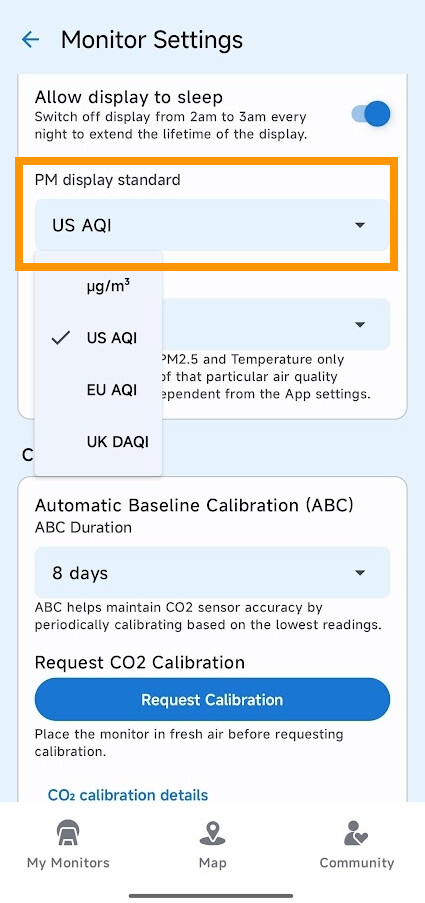
This was it alright. Thanks for the info!
1 Like
Thank you for letting me know about this.!
1 Like
By the way, there seems to be a lot of confusion or misuse of the term “AQI”. AQI is calculated using the metrics PM2.5 and O3 and NO2 and SO2 and CO. Most air monitors do no measure the gases, yet claim to give an AQI reading. For many devices and web sites AQI = PM2.5 only. Just sayin’.
AQI can be calculated from multiple pollutants and also from a single pollutant. There is a separate algorithm for each pollutant.
These documents are interesting for this topic:
1 Like
Thanks for the information.
1 Like
My pleasure. Please feel free to let us know if you have any questions.