AirGradient Forum

AirGradient Go: Battery Life and Care | AirGradient Knowledge Base

Hi @vlotty, thanks for your reply.

Could you share a bit more with us about which USB charger you used and observed that the plug icon disappeared after the battery reached 90%?

In the meantime, I will try using different chargers with the Go and observe how my Go behaves.

Thank you!

It charges to 90% and then stops charging with a few ways I’ve charged, using the Go’s included USB-C cable from my MacBook (recent model, Apple silicon), with an Anker 30W charger with USB-C PD and the Go’s included USB-C cable , a Baseus 65W charger using an USB-A to USB-C cable, and a 5V/3.5A outlet USB-A port and USB-A to USB-C cable.

1 Like

Hi @vlotty, hope you are having a nice day! Thank you for providing this info.

By ‘stops charging’, do you see these two indicators in the top right of your screen, or does only the battery indicator show without the plug (please see image below)?

I just would like to make sure again, but from your previous reply, it seems that only the battery indicator shows, with no plug or battery charging indicator - just the normal battery indicator alone. Do I understand correctly?


The battery FG Learning (fuel gauge learning) is also something we can try, but it takes quite a long time (could be a day or two), and you will not be able to use your AirGradient Go during that time which is quite a disruption for users. I am going to have a meeting regarding the battery and the FG Learning today. Maybe let me gather more info, and I’ll let you know.
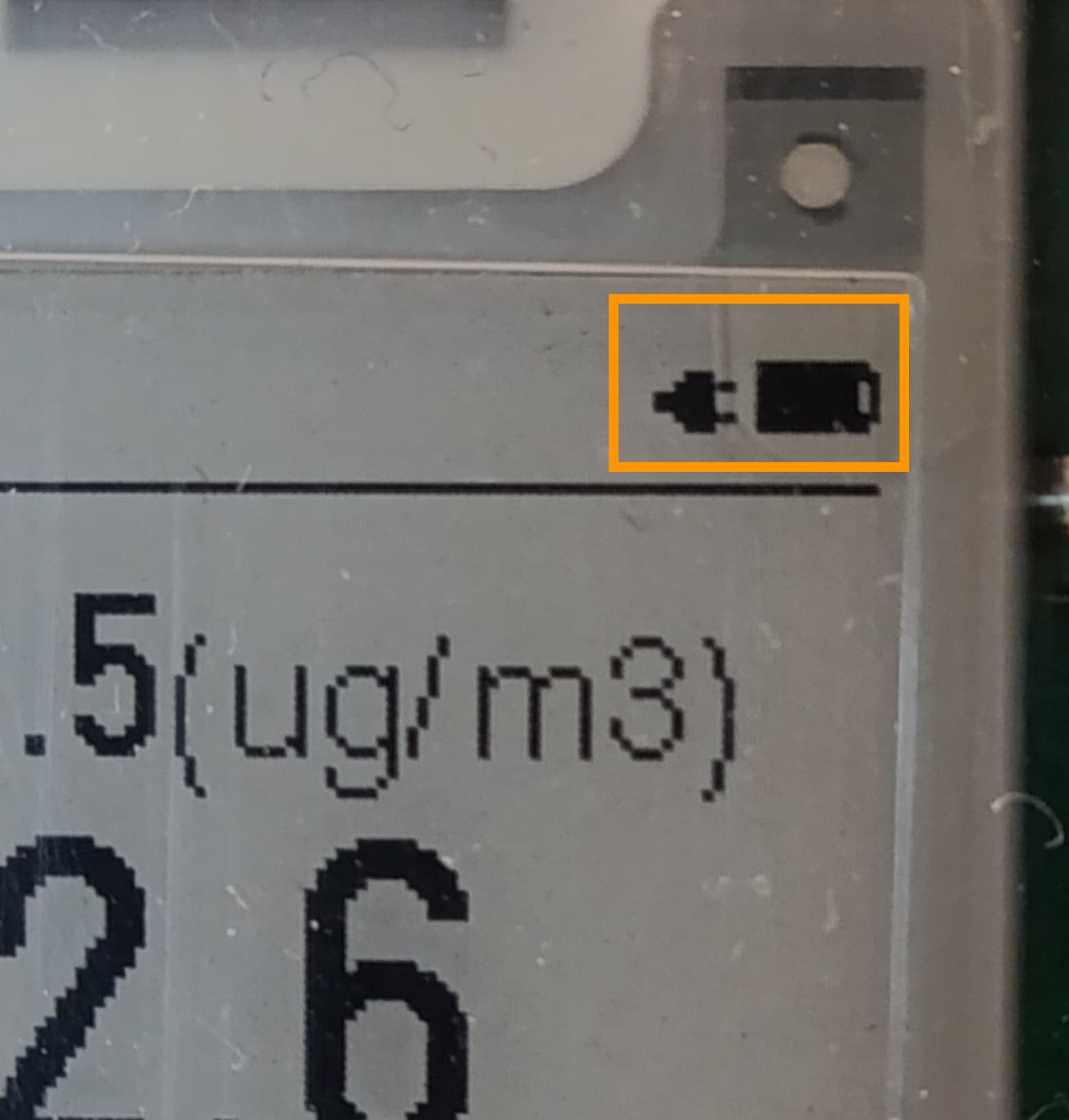
It looks like the image you shared, a plug and a battery, but no charging indicator.

Hi @vlotty, thanks for the reply. I discussed this with our engineers, and they suggested that battery FG Learning (Fuel Gauge Learning) could help in this case.

However, the process takes quite a long time (approximately 24+ hours), and you won’t be able to use the Go during the process.

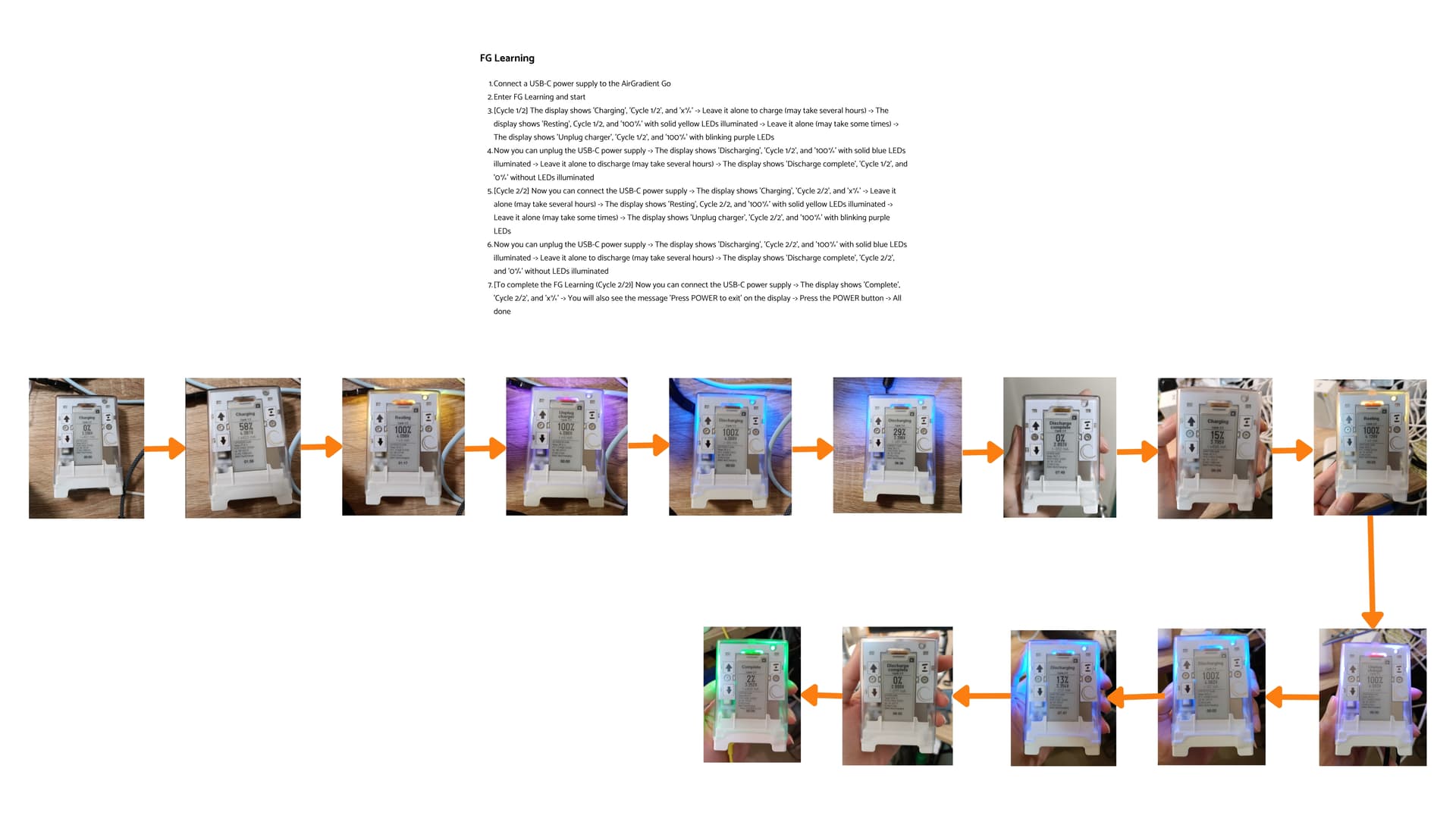
To run FG Learning, follow the steps below:

  1. Connect a USB-C power supply to the AirGradient Go
  2. Go to Settings → Hardware Test → FG Learning → tap Yes to confirm
  3. [Cycle 1/2] The display shows ‘Charging’, ‘Cycle 1/2’, and ‘x%’ → Leave it alone to charge (may take several hours) → The display shows ‘Resting’, Cycle 1/2, and ‘100%’ with solid yellow LEDs illuminated → Leave it alone (may take some times) → The display shows ‘Unplug charger’, ‘Cycle 1/2’, and ‘100%’ with blinking purple LEDs
  4. Now you can unplug the USB-C power supply → The display shows ‘Discharging’, ‘Cycle 1/2’, and ‘100%’ with solid blue LEDs illuminated → Leave it alone to discharge (may takes several hours) → The display shows ‘Discharge complete’, ‘Cycle 1/2’, and ‘0%’ without LEDs illuminated
  5. [Cycle 2/2] Now you can connect the USB-C power supply → The display shows ‘Charging’, ‘Cycle 2/2’, and ‘x%’ → Leave it alone (may takes several hours) → The display shows ‘Resting’, Cycle 2/2, and ‘100%’ with solid yellow LEDs illuminated → Leave it alone (may take some times) → The display shows ‘Unplug charger’, ‘Cycle 2/2’, and ‘100%’ with blinking purple LEDs
  6. Now you can unplug the USB-C power supply → The display shows ‘Discharging’, ‘Cycle 2/2’, and ‘100%’ with solid blue LEDs illuminated → Leave it alone to discharge (may takes several hours) → The display shows ‘Discharge complete’, ‘Cycle 2/2’, and ‘0%’ without LEDs illuminated
  7. [To complete the FG Learning (Cycle 2/2)] Now you can connect the USB-C power supply → The display shows ‘Complete’, ‘Cycle 2/2’, and ‘x%’ → You will also see the message ‘Press POWER to exit’ on the display → Press the POWER button → All done

Please feel free to let me know if you have any questions.

Good day!

The case should be changed so it they could actually lightup the diplay… :)…without a led dispay is not readable half a day… we need new case for unit anyhow to fix temperature.
And better gos antena… As no a joke of devices thinks it has a fix with +/- 500m iit is as accurate as temperature…
Product it not ready dor anything…
I hope we receive fixed and updated parts… Someday.

I’ve completed the FG learning, although I’m not quite clear on what it’s supposed to do-- is it just battery calibration? The device indicates somewhere between 8-9 hours to discharge fully. I suppose we will see if it helps with battery life-- I’m not sure calibration is why it would only last about 1-1.5 days instead of many days/weeks on the lowest sensor update frequency as the simulator had predicted?