Hi @mckeont, welcome to our community!
Unfortunately, the AirGradient ONE doesn’t have the internal storage to store the data on-device.
If possible, you might ask the office’s IT department to help create a separate Wi-Fi network for this. But if it is not possible, the next choice is connecting the AirGradient ONE to a 3G/4G/5G Wi-Fi router (it’s like you connecting it to your mobile hotspot).
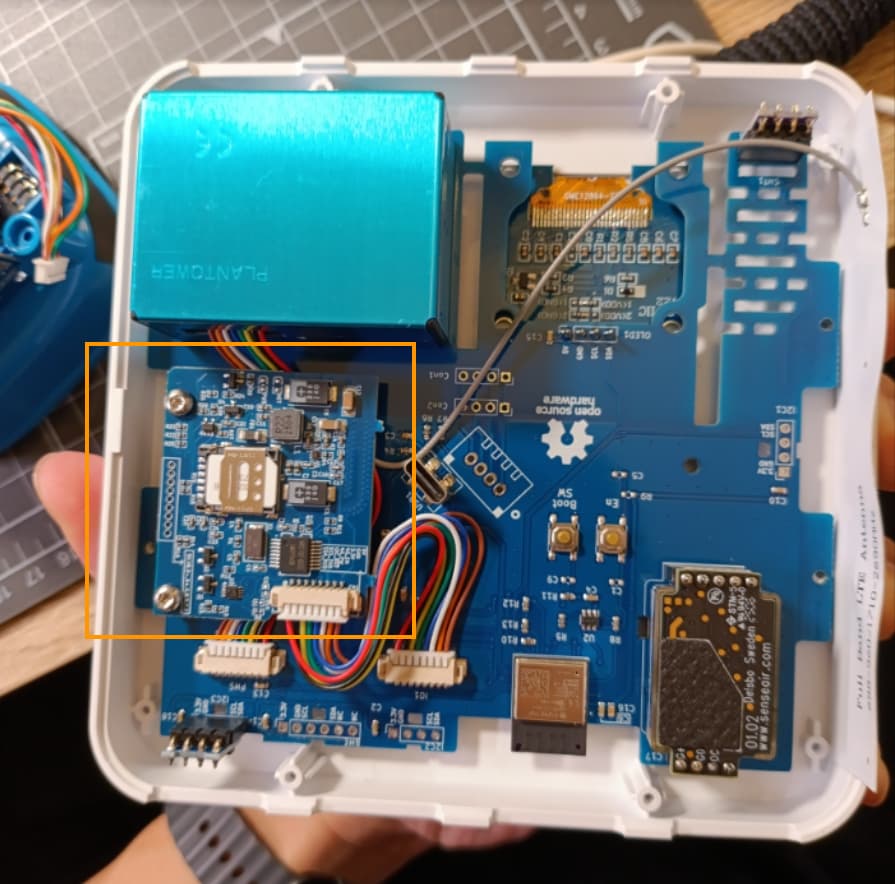
Another practical way (but requires additional hardware) is using the cellular module with your AirGradient ONE. We haven’t listed this on our shop yet, but please feel free to contact us here: https://www.airgradient.com/support . When you connect the cellular module (the module has SIM card and it connects via cellular network like your mobile phone) to your AirGradient ONE, it will be able to use the cellular internet to send the data to the AirGradient Dashboard.
The information below is to answer your other questions.
The offline mode of the AirGradient ONE is a mode that lets the ONE operate without connecting to Wi-Fi, and the OLED display and LED bar won’t notify that the device is offline, it will just show an airplane icon (in normal mode, when there’s no Wi-Fi connected, the ONE shows error alerts on the LED bar and the display). However, the offline mode doesn’t store the data on the device.
The API (both local API and cloud API) needs a Wi-Fi network to transmit data.
There is another way that could be used (only as a workaround), which is to collect your AirGradient ONE’s log by connecting the AirGradient ONE to a computer via a USB cable. Run the AirGradient ONE in offline mode. Then use our debug log web page: Online Debug | AirGradient Knowledge Base to log the data. However, I can’t really say that I recommend for air quality measurement purposes, as it could be unreliable over several hours (such as the USB port stops communicating, the computer’s memory crashes, as the web browser consumes more memory when the data piles up), but it should work as a workaround for a few hours.
If you think this way is fine, I’d suggest using tools like VS Code (with extensions) to log data and have it periodically (and automatically) saved as text files on your computer. This avoids the memory crashes mentioned above.
Your data will look like this (the interval is around 6 seconds):
[02:29:49]CO2 = 1713.33 ppm
[02:29:49]Temperature = 31.17 C
[02:29:49]Relative Humidity = 73.99
[02:29:49]TVOC Index = 34.8
[02:29:49]TVOC Raw = 31027.1
[02:29:49]NOx Index = 1.0
[02:29:49]NOx Raw = 16942.7
[02:29:49][1] Atmospheric PM 1.0 = 0.00 ug/m3
[02:29:49][1] Atmospheric PM 2.5 = 0.00 ug/m3
[02:29:49][1] Atmospheric PM 10 = 0.00 ug/m3
[02:29:49][1] Standard Particle PM 1.0 = 0.00 ug/m3
[02:29:49][1] Standard Particle PM 2.5 = 0.00 ug/m3
[02:29:49][1] Standard Particle PM 10 = 0.00 ug/m3
[02:29:49][1] Particle Count 0.3 = 57.3
[02:29:49][1] Particle Count 0.5 = 44.0
[02:29:49][1] Particle Count 1.0 = 13.0
[02:29:49][1] Particle Count 2.5 = 1.7
[02:29:49][1] Particle Count 5.0 = 0.0
[02:29:49][1] Particle Count 10 = 0.0
I hope this helps. Please feel free to let me know if you have any other questions!