More as a heads-up for others not running into this issue.
After receiving two broken (and correctly refunded) SGP41 modules from AliExpress I decided it would be a great challenge to have the opensource SGP41 PCB soldered myself.
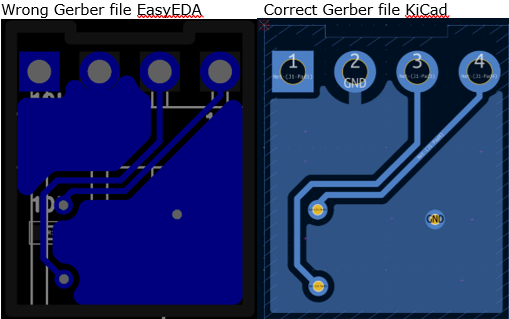
But after soldering two not working PCB’s I found there is an issue with the GND circuit which is not continuous (open circuit). This issue is present after importing the KiCad files (SGP41-sensor-module_V3.zip) in EasyEDA, and so also in the exported Gerber file from EasyEDA.
Just tried with an export from within KiCad (File>Fabrication Outputs>Gerbers(.gbr)>Plot & Generate Drill Files) and that works fine.
Of course I will correct this with a jumper wire, but wonder if a change in KiCad could have prevented this?