Hi, I bought the Airgradient One kit and received a PM sensor with serial number starting with PMS5003-20250918. I’ve read that a calibration formula needs to be applied and I can see the settings but there is no option for this particular batch of sensors. Will this be made available soon?
Calibration for the PMS5003 sensor can be difficult to nail down accurately at first. Let me try to explain the list of calibration formula options you see by default.
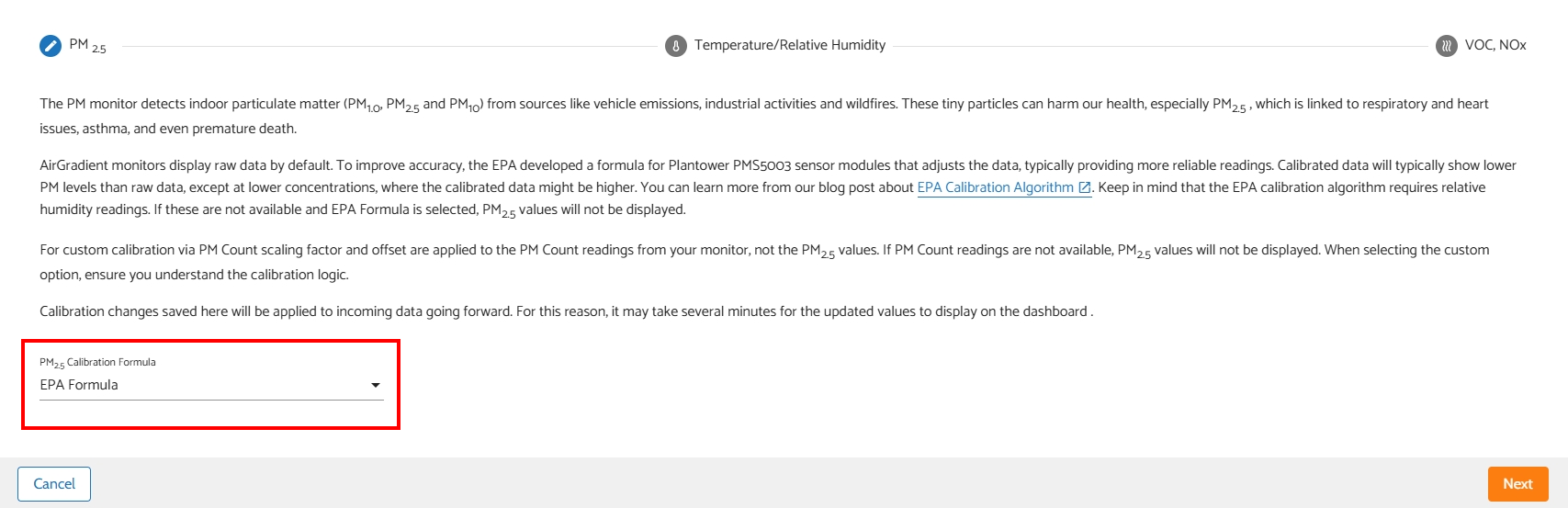
When selecting PM2.5 calibration formula, you generally see two sets of options. “Specific formulas by specific batch,” and 4 custom options (RAW Data, EPA Formula, Custom via PM Count, Custom via PM2.5 RAW).
“Specific formulas by specific batch” options come from previous test efforts. That is, somebody took the time to test the PM2.5 sensor, came up with what they found to be the most accurate formula (in their mind). This formula is then provided in the list of “specific formulas by specific batch,” named to indicate the sensor type it’s intended for and the date the testing and resulting formula were performed/created.
For example, one option is “PMS5003T_20250208.” This indicates that this formula is intended for the PMS5003T sensor, and the formula was derived on 02/08/2025. When you select this option, you essentially are selecting a preset that will fill out a number for Scaling Factor, Offset, and whether or not to apply the additional EPA calibration formula.
With time, the definition of an “accurate formula” changes. This is because so many factors impact air metrics and our ability to read/detect them. Humidity and temperature have a big impact on the PM2.5 sensor. If you live somewhere that experiences regular humidity, somebody else’s definition of “accurate,” could very well be very inaccurate for your situation.
When I realized that the most recent provided formula for my PM2.5 sensor was not giving accurate readings, I began testing. I have a handheld TemTop M2000 that I watched while standing within inches of my outdoor Air Gradient 0-1PST monitor. When coming up with a formula, you’re striving for a balance between no pollution and heavy pollution. To clarify, if you have too high of a scaling factor value, low pollution levels will be reported inaccurately and be exaggerated/inflated. As a result however, higher pollution levels will be reported more accurately. With too low of a scaling factor value, low pollution levels will be read easier and reported more accurately–but high pollution levels will be very inaccurate and inflated. In conclusion, it’s a process of finding the right spot for the scaling factor and then using the offset value to +/- a defined amount to/from the data the sensor got by using your scaling factor value.
If it is of any help, I’m currently using the following settings (on my 0-1PST monitor) after much testing.
Formula: Custom via PM Count, Scaling factor: 0.02189, Offset: 3, Apply EPA Formula = Yes
When the air is perfect outside and has less than 1μg/m³, the monitor steadily reads 1.5-2μg/m³. Pollution where I live doesn’t often hit super high numbers, so it’s difficult to know at what point my formula begins to behave sporadically. However, outdoor PM2.5 levels have reached as high as 40μg/m³ and the formula still reports very accurately. Again, your formula can heavily depend on the average outdoor conditions in your location.
I know this is a long reply, but it’s a thoughtful one and I’ve spent a lot of time learning how to understand this area over the years. If I can answer any other questions, I’ll do my best to point you in the right direction. As always, I’m open to advice and criticism if anybody believes I’m not explaining things in an optimal way.
-Clancy
Hi @perceive8205, welcome to our community! Currently, there’s no specific calibration formula for PMS5003-20250918. In this case, we generally recommend applying the EPA formula. We will let you know when we have an update on this specifically.
Hi @Clancy, welcome to our community as well! And thank you for sharing your experience in detail. I’d like to help you correct this if you don’t mind (I’m not intending to be micromanaging here, just for people who come here to this thread in the future to get a little bit more accurate details) :
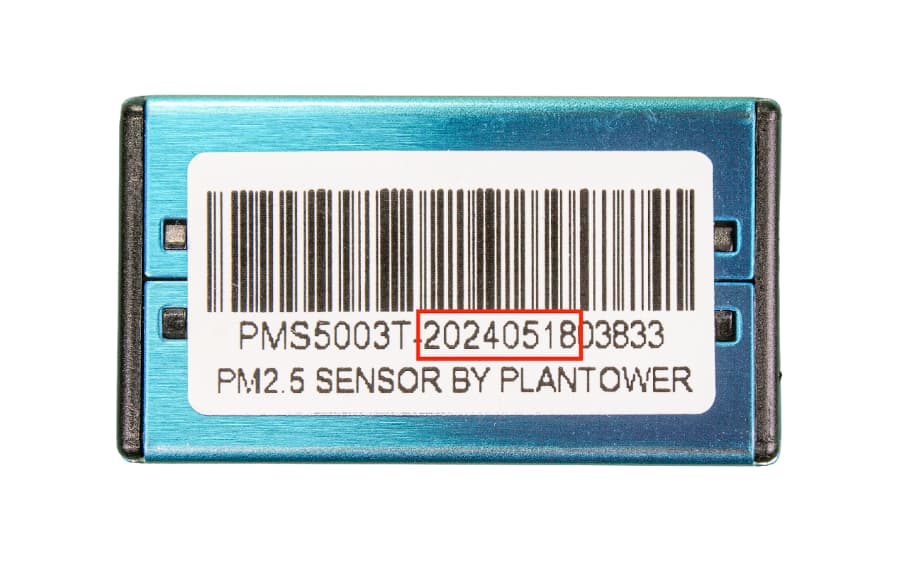
For example, one option is “PMS5003T_20250208.” This indicates that this formula is intended for the PMS5003T sensor, and the formula was derived on 02/08/2025.
The number 20250208 is actually the batch number shown on the sticker of a PMS module, not the date that the formula was derived.
Appreciate it a lot for your contribution. I’m looking forward to seeing more interesting findings from you!
1 Like