I have my new airgradient one set up and working, with the latest firmware installed. Measurements are showing up in the dashboard. Lights and measurements are showing up correctly on the device. However I can not get dashboard analytics to show up, no matter what I try. My serial number is a0f262da16b0. I would like to be able to see my history.
Hi @rgp1942! can you try selecting the location and then checking the tick mark next to it? That should add it to the Analytics view and allow the historical data to appear.
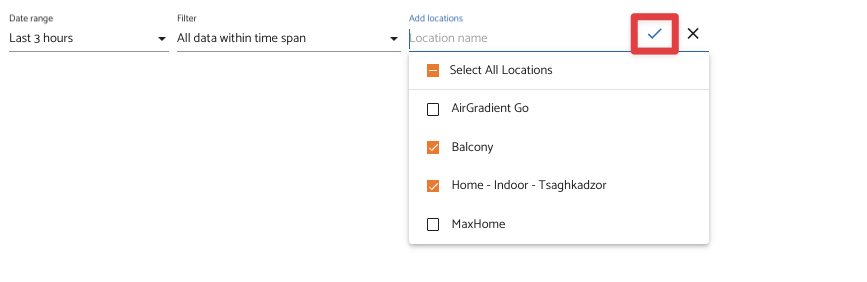
That said, we’ve had several reports the UI flow here is confusing. I will log this so this is changed.
The location selection step is what usually gets missed, so it helps that you confirmed measurements and firmware are fine first. In Wilmington I’ve seen similar dashboard views where the tick mark is easy to overlook because it sits next to the location name rather than on the chart itself. If you still get an empty history after selecting the location, note whether the time range resets. Logging the confusing UI flow is the right call, since the fix here is really clearer affordance rather than a hardware problem.
Hi @elfredajackson, thank you for sharing your feedback. I have logged your feedback about the overlooked checkmark. We will let you know once we have an update. Thanks!