Hi @miha - sorry for the late response! We’ve double checked with OpenAQ and there are no known issues with the integration right now. Unsure what could be preventing your monitor from showing up on the OpenAQ map. Could you please go to Hardware>Monitors>Edit Location>Data Sharing and check whether " Share your data with OpenAQ" is checked? If yes, maybe unchecking, then Saving and rechecking might help resolve this.
Hi, @Altair_AirGradient I would like my Airgradient to feed into IQair (and AQIcn) but I can’t figure out how. As per the previous post I have everything ticked in ‘data sharing’ but my sensor has never shown up on IQAir. It isn’t showing up on the OpenAQ map either.
I set up my sensor in January and had everything enabled since then.
What I have noticed is that under ‘general settings → connectivity’, the toggle for API Access is off. Should that be on (I have just turned it on, even though I’m not sure what it means!)? If so, shouldn’t that be automatically on if I select yes to data sharing?
I have the same Problem.
The checkbox for sharing with IQair is missing.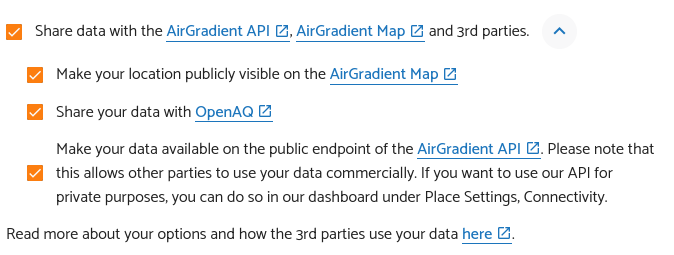
Since I already have your device’s SN, I will check on it.
Hello! IQAir pulls data of AirGradient monitors via Open AQ (and no longer directly from us) so we have no control what they are doing on their end. The option to share data with IQAir is no longer available since they didn’t follow some data sharing accreditation rules.
Hi, can I follow up on the fact that my sensor is not showing up on Open AQ website? I just checked and it’s still not there. Thank you!
Hi @Bangkokdi! Thanks for the follow-up. I am unsure why your device does not appear on the OpenAQ map especially if you’ve already enabled data sharing. I would suggest to disable and then enable data sharing again to see if that helps. Is the device visible on the AirGradient map?
Hi, yes it is and always has been on the AirGradient map. Still not on OpenAQ though…
Hi @Bangkokdi,
Could you reach out to support@airgradient.com with the exact location of your monitor and the serial number? Altair or myself can then take a look into this.
A bit of an update for @Bangkokdi, @RedTigerAQM, @miha and anyone else still experiencing the OpenAQ issue.
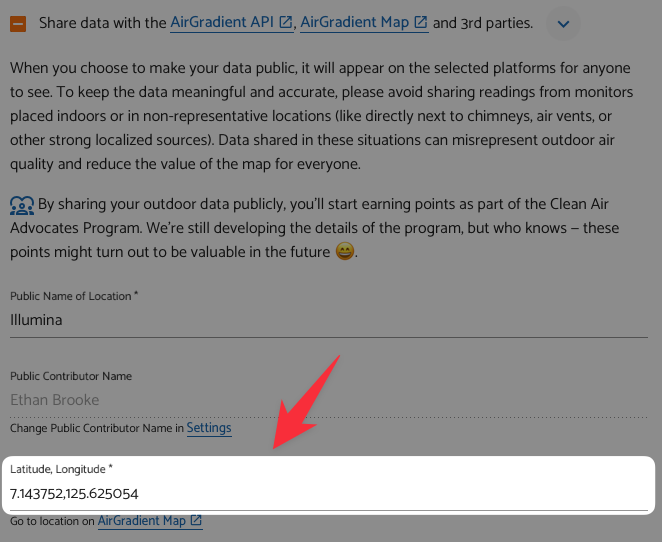
I’ve just been in contact with them and I believe the issue comes down to the latitude and longitude entered on the AG dashboard. Basically, OpenAQ will only ingest data if both latitude and longitude have at least three decimal points to ensure high precision. If your monitor is not showing on OpenAQ, please ensure that you have at least three decimal points for both latitude and longitude.
Assuming IQAir is still pulling data through OpenAQ, this should also mean that data begins to appear there after some time.
Thanks - can you remind me how to get to the page above? I can’t find it anywhere in the settings.
Ok I found it! But both my latitude and longitude have 6 decimal places, so that can’t be the problem.
After lots of communication, I believe we’ve found the cause of this issue.
Very simple/common contributor names - in my case ‘Ethan’ - can cause issues on OpenAQ’s side and require a manual check as each name/contributor is tied to a monitor entity. With a name such as ‘Ethan’, there are likely already other contributors using the same name and this triggers a manual review.
However, using a more unique name (in most cases a full name will be enough), this shouldn’t be an issue. Therefore, if your coordinates already have more than 3 decimal places yet you still can’t see your device on OpenAQ, please check your contributor name and make it more unique if possible.
1 Like