We will include this in the default firmware and are also working on an improved algorithm especially for lower temperartures. I expect I can post it here next week.
3 Likes
I haven’t been able to test out the suggested modifications yet but I’m glad to hear things are still moving along. I hopefully can make the changes on Saturday before another cold front comes in.
I just published an update to my ESPHome configs that adds the compensation for both temperature and humidity for the Outdoor models.
@Achim_AirGradient Does the formula work for both the model with dual PMS5003T sensors and the one with a single one, or is the head load inside of the enclosure different?
Yes. We only see very small deviations between the two models.
Anika, our science lead went through around 300.000 temperature data points (AirGradient and reference stations) ranging from -28C to +37C -so covering a very wide range.
There are two different formulas needed for temperatures below 10C and above 10C as the curve across the whole range of temperatures is not completely linear:
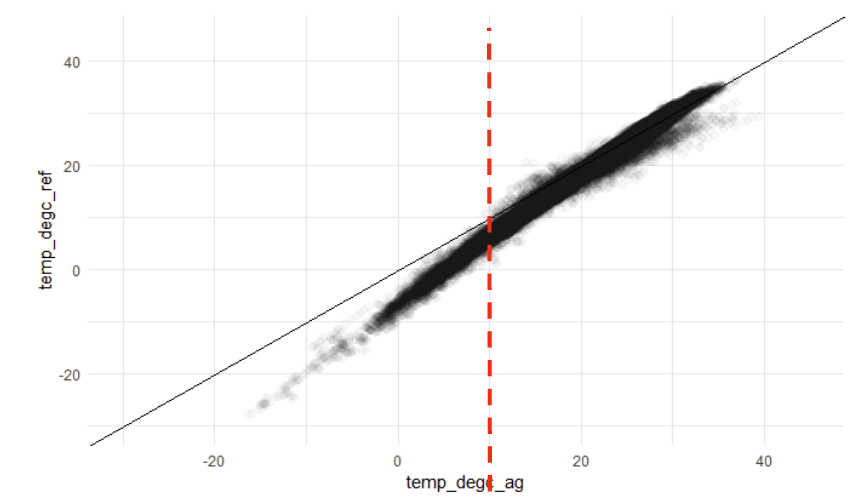
The formulas are the following:
Below 10C: raw*1.327 - 6.738
Above 10C: raw*1.181 - 5.113
As a result we get a well corrected temperature curve as below:
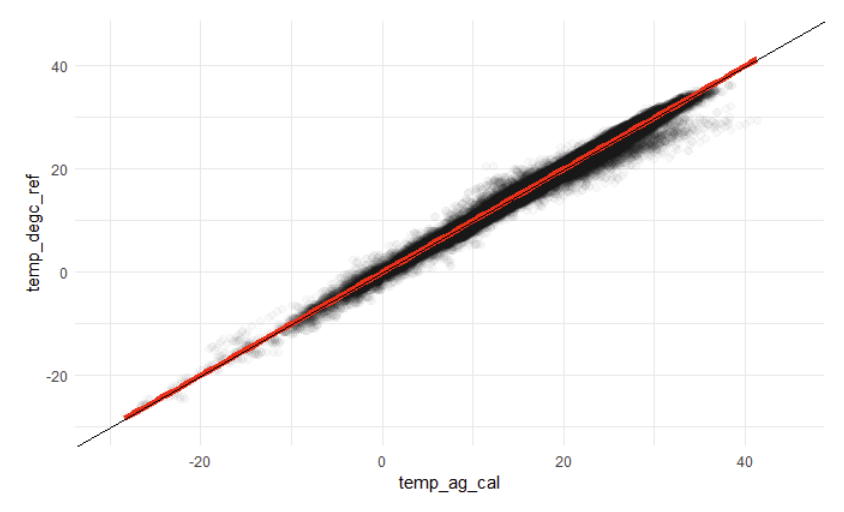
The data points you see on the higher temperatures that are further away from the red line is where the AirGradient monitor is exposed to direct sunlight. So it’s important that it is installed in the shadow.
This is just the pre-information. There will be a more detailed blog post with more background information following but I wanted to publish the formula already as I know that people waiting for this.
3 Likes
For those using ESPHome, those formulas look like this:
    filters:
      - lambda: !lambda |-
          if (x < 10.0) return (x * 1.327) - 6.738;
          return (x * 1.181) - 5.113;
I assumed that ‘above’ meant ‘equal to or above’.
1 Like
Thanks @kpfleming
I just put the old algorithm into my branch yesterday along with a workaround for the negative temp issue. Using what you posted along with that, I’m now in the process of updating to this:
    temperature:
      name: "Temperature"
      id: temp
      filters:
          # https://forum.airgradient.com/t/outdoor-temperature-and-humidity-reading-correction/1544/19
        - lambda: !lambda |-
            // Remove line with (x > 6000) once the negative number issue fix is merged in https://github.com/esphome/issues/issues/3814
            if (x > 6000) return ((x - 6553.6) * 1.327) - 6.738;
            if (x < 10.0) return (x * 1.327) - 6.738;
            return (x * 1.181) - 5.113;
2 Likes
Looks nice! There won’t be any rush to remove the x > 6000 line, since there won’t be any legitimate readings that high 
Alright, I did something a little different. I found the Arduino-NG git and as I like tinkering/testing stuff out. Seeing as I have the 1.3 board that it targets I went ahead and copied the example code for the O-1PP and applied the formulas to this version. So far the temperature are reporting close to what is expected (External sources reporting 41F(5C) while the outdoor sensor is reporting 42.8 (6c)). I’ll keep an eye on this and report back any issues.
I’ll wait for the next release and some parts that I ordered from the AirGradent Store before doing any more tinkering.
Great that you already found the Arduino NG repo. This is a complete rewrite of the Arduino library but is still in developing and testing and still contains a few bugs that we currently eliminate.
Alright, got the parts in and turned my O-1PP into a O-1PST! I have part for a second one but I am waiting on some screws for the 3D printed case. (Side note: M1.8x11 Torx T6 screw are hard to source so i ended up ordering M1.7x10 Phillips head screws). Anyway I used the latest Arduino-NG code and waiting to see how it hold up before trying to apply any corrections.
Do I need to update my firmware to apply these two formulas? (Has it been updated with them yet?)
Which firmware are you running? It’s already implemented in MallocArray’s ESPHome integration but not yet in our Arduino code base.
You show it’s a curve and then give two linear formulas. Wouldn’t fitting to the curve and giving a non-linear formula be more accurate?
It is not a curve because the bigger temperature measurements that are more off are due to direct sun exposure which should not be part of the algorithm.
I’d be curious if there are any standards or best practices to ensure mounting in shade, but also not restricting airflow or being influenced by the surrounding objects?
Here are some general guidelines:
- Height: Please do not place the sensor below 150cm as dust from the ground could influence the readings
- Walls: Please ensure that the walls are not too hot (or cold) due to exposure from the inside as this might negatively influence the temperature sensor.
- Sunlight: In order to get accurate temperature readings, please ensure that the sensor unit is not exposed to direct sunlight at any time of the day.
- Doors/Windows: In order to have stable readings, we recommend not to put the sensor unit close to doors or windows.
- Air Conditioner / Ventilation Outlet: Please do not place the sensors closer than 2 meters to any HVACsystem or ventilation outlet
3 Likes
I’m running the stock firmware. I’m not sure which version, as the dashboard doesn’t have anything in that column.
If you haven’t updated in the last 2 weeks or so, then I would install the firmware again to ensure you are on the latest
There’s not any way to do this remotely, is there? I can’t say I like the idea of going out with a laptop in freezing temperatures every time there’s a firmware update…